CartPulse AI
AI-Powered Cart Abandonment Prevention for WooCommerce
Table of Contents
- Introduction & Overview
- Installation & Activation
- Setup Wizard
- Dashboard
- Campaign Management
- Trigger Configuration
- Intervention Content & Design
- Merge Tags Reference
- Coupon Configuration
- Live Campaign Preview
- Campaign Scheduling
- Campaign Import / Export
- Preset Library
- A/B Testing
- Spin-to-Win Wheel
- Email Capture Intervention
- Analytics Dashboard
- Live Visitors Dashboard
- Cart Recovery Emails
- Complete Settings Reference
- Tools & Diagnostics
- REST API Reference
- Webhooks
- WP-CLI Commands
- Hooks & Filters Reference
- Intent Scoring Deep Dive
- Privacy & GDPR
- How the Storefront Works
- Demo Data System
- Compatibility
- Best Practices & Strategy Guide
- Troubleshooting
- FAQ
- Changelog
- Support & Credits
1. Introduction & Overview
CartPulse AI is a WooCommerce plugin that detects when visitors are about to abandon your store and delivers intelligent, AI-powered interventions to recover lost sales. It combines real-time behavior tracking, exit-intent detection, and optional AI content generation to show the right message at the right moment — turning abandoned carts into completed purchases.
How It Works
- Track — The storefront script silently monitors visitor behavior: scroll depth, time on page, cart activity, tab switches, and checkout progress.
- Score — An intent scoring engine calculates a 0–100 purchase-intent score in real time based on 12 weighted signals.
- Trigger — When behavior matches your campaign rules (exit intent, idle timeout, cart value threshold, etc.), a campaign fires.
- Intervene — A personalized popup, slide-in, bar, or spin-to-win wheel appears with the right message and offer.
- Convert — Revenue attribution tracks which interventions drove completed purchases, giving you exact ROI data.
- Measure — Interactive analytics charts show revenue saved, strategy effectiveness, and funnel performance.
Key Features at a Glance
9 Trigger Types
Exit intent, idle timeout, scroll depth, tab switch, cart value, checkout abandon, URL pattern, referrer match, cart contains.
7 Template Styles
Popup, slide-in, top bar, bottom bar, fullscreen, inline, and spin-to-win wheel.
6 Intervention Strategies
Personalized discounts, free shipping, social proof, urgency, objection handling, value reminders.
AI-Enhanced Content
Optional OpenAI / Anthropic integration for dynamic, context-aware messaging. Works great without AI too.
Visual Analytics
4 Chart.js-powered charts: revenue line, bar, donut, and funnel. CSV export included.
12 Campaign Presets
Ready-made, one-click campaigns covering urgency, discounts, social proof, recovery, and gamification.
A/B Testing
Split test variants with auto-winner detection at a configurable statistical confidence threshold.
Privacy-First
Auto-detects 6 consent plugins, respects DNT, GDPR exporters/erasers, configurable data retention.
Works Without AI
CartPulse AI ships with built-in templates that use merge tags to pull real WooCommerce data (cart totals, recent purchases, product ratings). No API key is required for core functionality. Adding an AI provider (OpenAI or Anthropic) enhances interventions with dynamically generated, context-aware copy. You control costs via a monthly budget cap.
System Requirements
| Requirement | Minimum | Recommended |
|---|---|---|
| WordPress | 6.0 | 6.4+ |
| PHP | 7.4 | 8.1+ |
| WooCommerce | 8.0 | 9.0+ |
| MySQL / MariaDB | 5.7 / 10.3 | 8.0 / 10.6 |
| PHP Extensions | — | sodium (for API key encryption) |
| Memory Limit | 128 MB | 256 MB |
2. Installation & Activation
Method A — WordPress Admin Upload
- Download the
cartpulse-ai.zipfile from your CodeCanyon purchase. - In WordPress, navigate to Plugins → Add New → Upload Plugin.
- Choose the ZIP file and click Install Now.
- After installation completes, click Activate Plugin.
Method B — FTP / File Manager
- Extract the ZIP file on your computer.
- Upload the
cartpulse-aifolder towp-content/plugins/via FTP or your hosting file manager. - In WordPress, go to Plugins and click Activate next to CartPulse AI.
What Happens on Activation
When you activate CartPulse AI for the first time, the plugin automatically:
- Creates 7 database tables — sessions, behavior events, campaigns, intervention logs, analytics, token usage, and cart recovery.
- Sets default settings — Safe defaults for tracking, privacy, and behavior configuration.
- Registers cron events — 6 scheduled tasks for analytics aggregation, data cleanup, coupon cleanup, schedule processing, optional purchase verification, and cart recovery emails.
- Imports demo data — Sample campaigns (saved as drafts) and synthetic analytics. The storefront remains admin-only until you complete the Setup Wizard, so guests do not see demos or interventions.
- Redirects to the Setup Wizard — A 5-step onboarding wizard guides you through initial configuration.
3. Setup Wizard (5 Steps)
The setup wizard runs automatically on first activation and can be accessed later from CartPulse AI → Setup Wizard. It has 5 steps:
Step 1 — Preflight Checks
The wizard verifies your environment before proceeding:
| Check | Required | Action if Failed |
|---|---|---|
| WooCommerce active (≥ 8.0) | Yes | Install and activate WooCommerce |
| PHP version (≥ 7.4) | Yes | Upgrade PHP via your hosting panel |
| libsodium extension | No (recommended) | Contact host to enable ext-sodium |
| Database tables installed | Yes | Run migrations from Tools page |
| Memory limit (≥ 128 MB) | No (recommended) | Increase in php.ini or wp-config.php |
If any required check fails, the Next button is disabled until the issue is resolved.
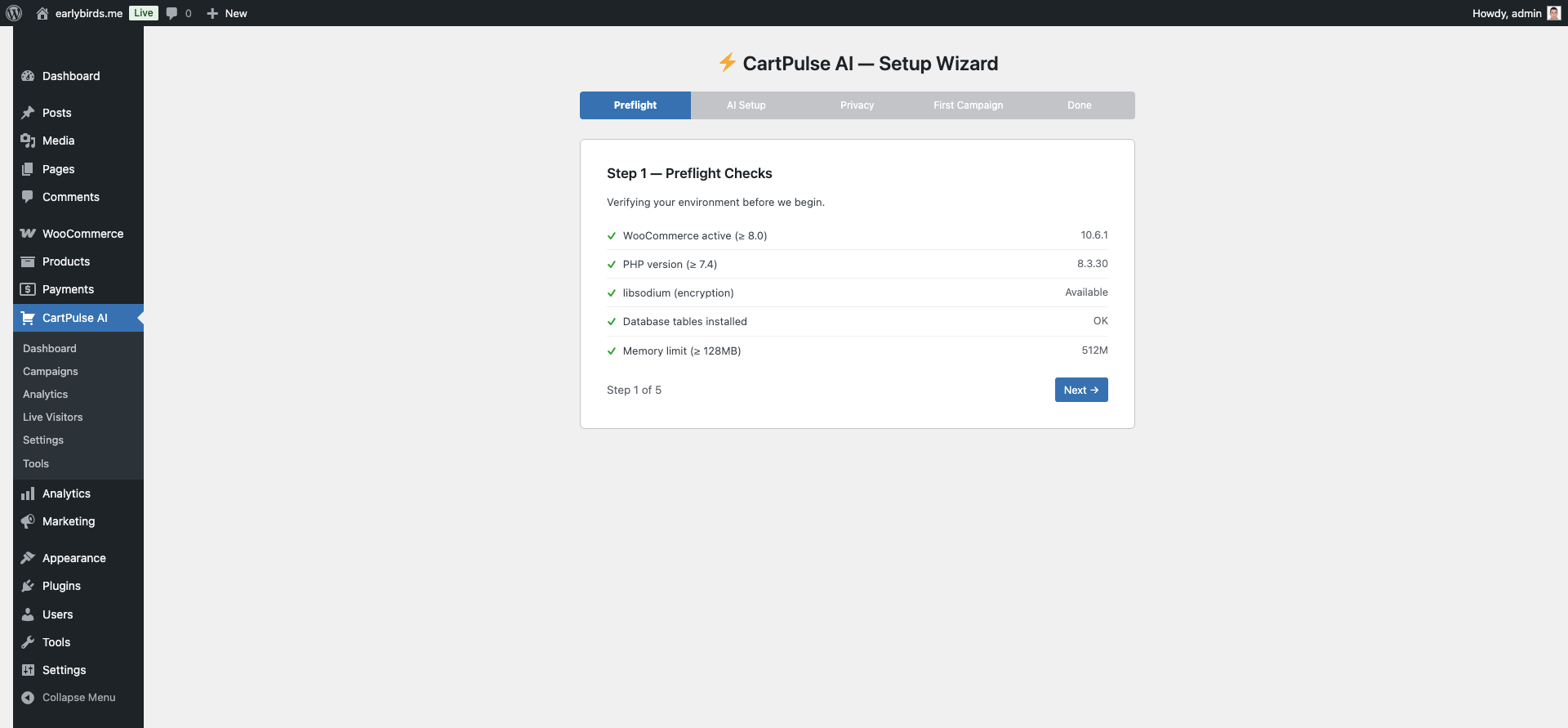 Setup Wizard — Step 1: Preflight Checks
Step 2 — AI Provider Setup
Configure your AI provider for dynamic content generation. This step is optional — you can skip it and use static templates with merge tags.
- Provider — Choose OpenAI or Anthropic (or leave blank to skip).
- API Key — Enter your key. It is encrypted at rest using libsodium and never displayed after saving.
- Test Connection — Verify the key works before continuing.
- Monthly Budget (USD) — Hard cap on AI API spending (default: $50). When the budget is reached, campaigns fall back to static content.
- Default Tone — Friendly, Professional, Urgent, or Casual.
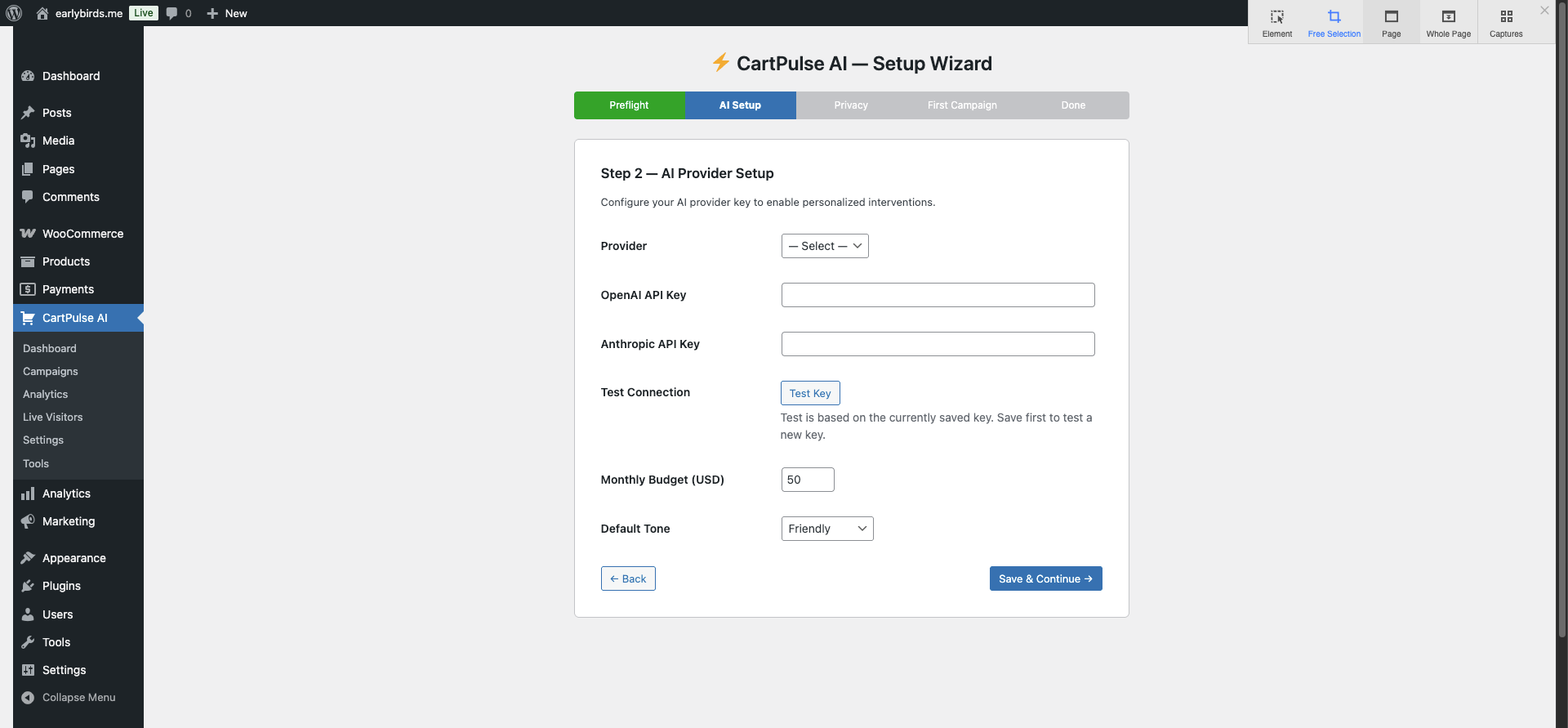 Setup Wizard — Step 2: AI Provider Setup
Step 3 — Behavior & Privacy
- Excluded Roles — Select WordPress roles that should never see interventions when live (Administrator and Shop Manager are excluded by default). Use Preview mode or a private/incognito window to test the shopper experience.
- Respect Do Not Track — Whether to honor the browser DNT header.
- Session Timeout — Minutes of inactivity before a session expires (default: 30).
- Data Retention — Days to keep behavior data before automatic purge (default: 30, max: 365).
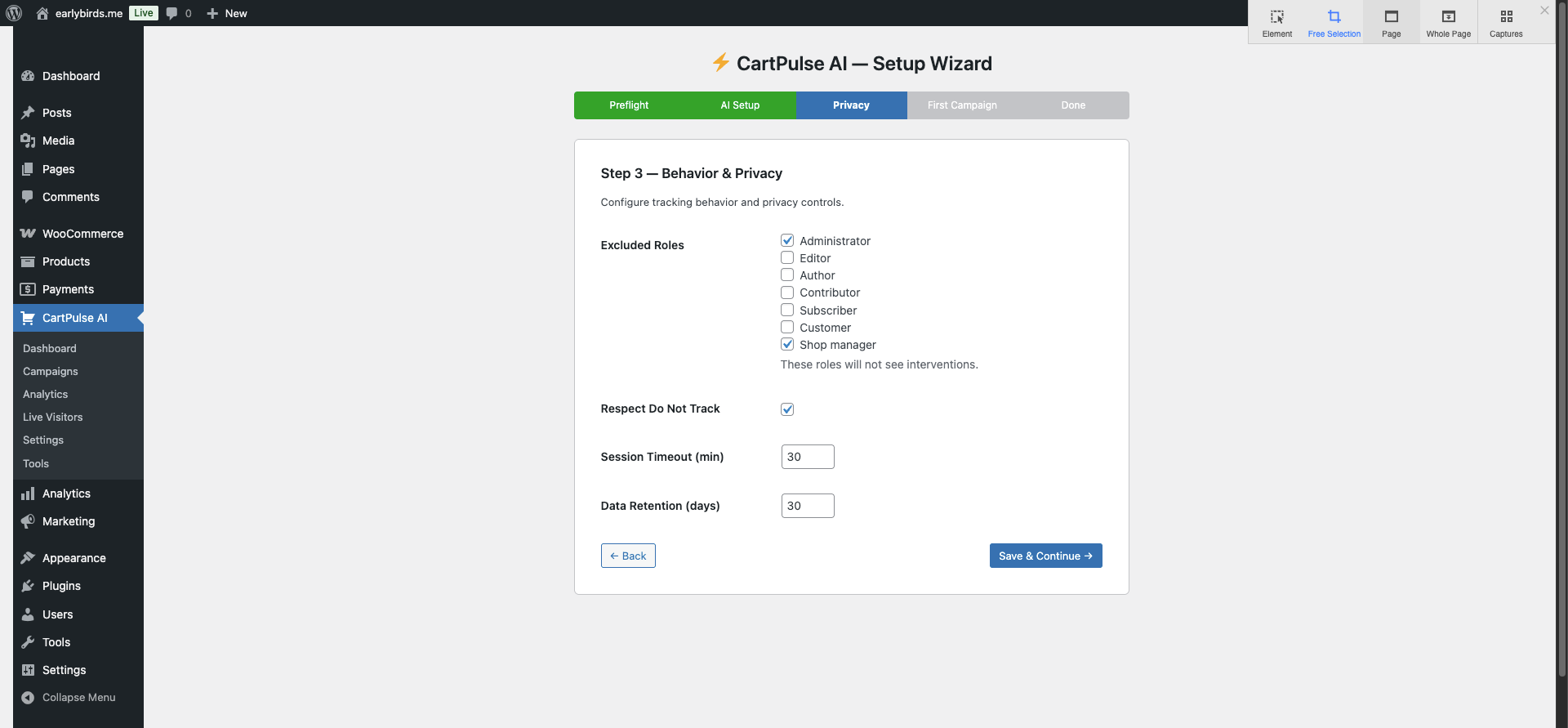 Setup Wizard — Step 3: Behavior & Privacy
Step 4 — First Campaign
Choose from 3 recommended presets to launch immediately, or skip to configure campaigns manually later:
- Flash Urgency Countdown — Exit-intent popup with urgency messaging and 10% coupon.
- Free Shipping Nudge — Top bar on cart page encouraging customers to add more for free shipping.
- Personalized Discount Offer — AI-generated exit-intent popup with 10% discount (requires AI key).
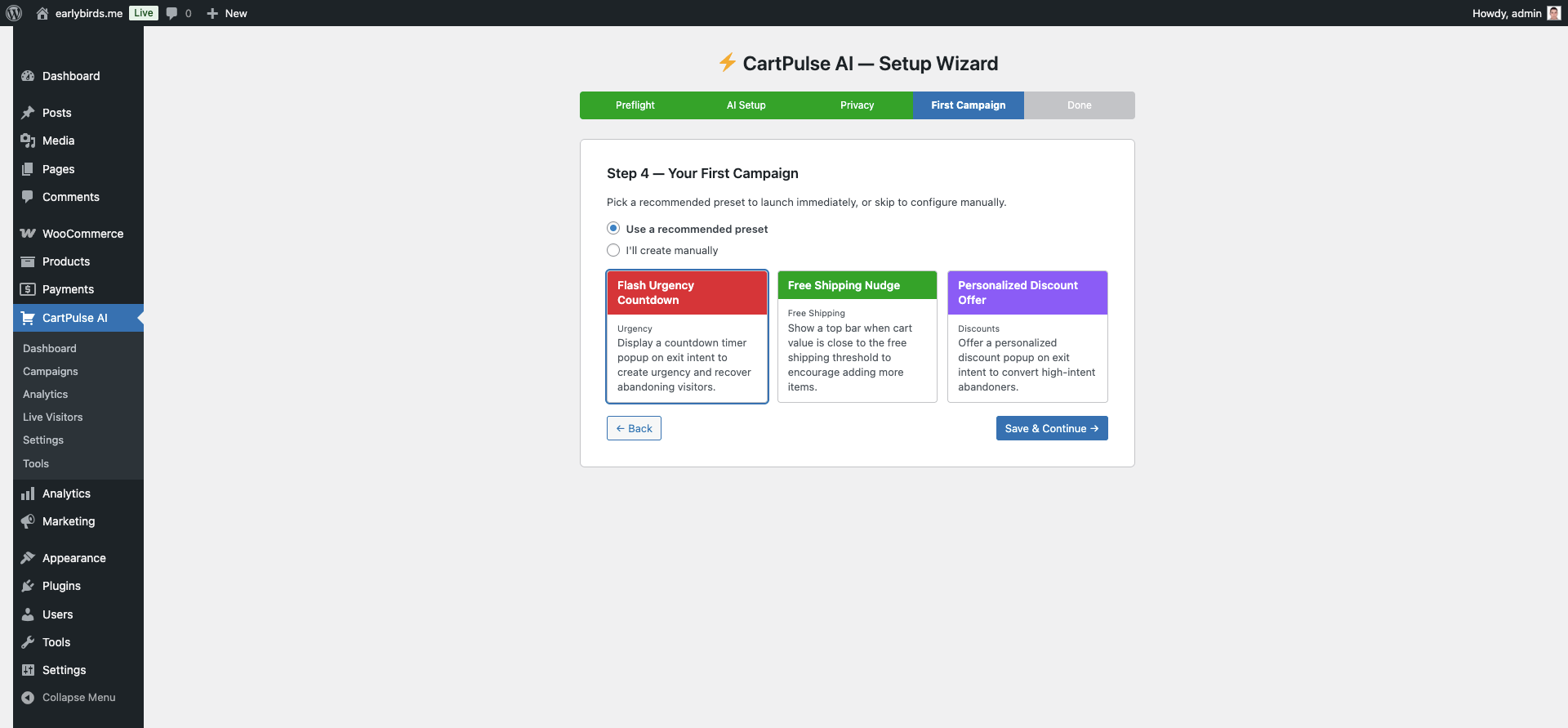 Setup Wizard — Step 4: First Campaign
Step 5 — Done
Summary of your configuration: AI provider status, number of campaigns created, tracking status. Quick links to Dashboard, Campaigns, and Settings pages.
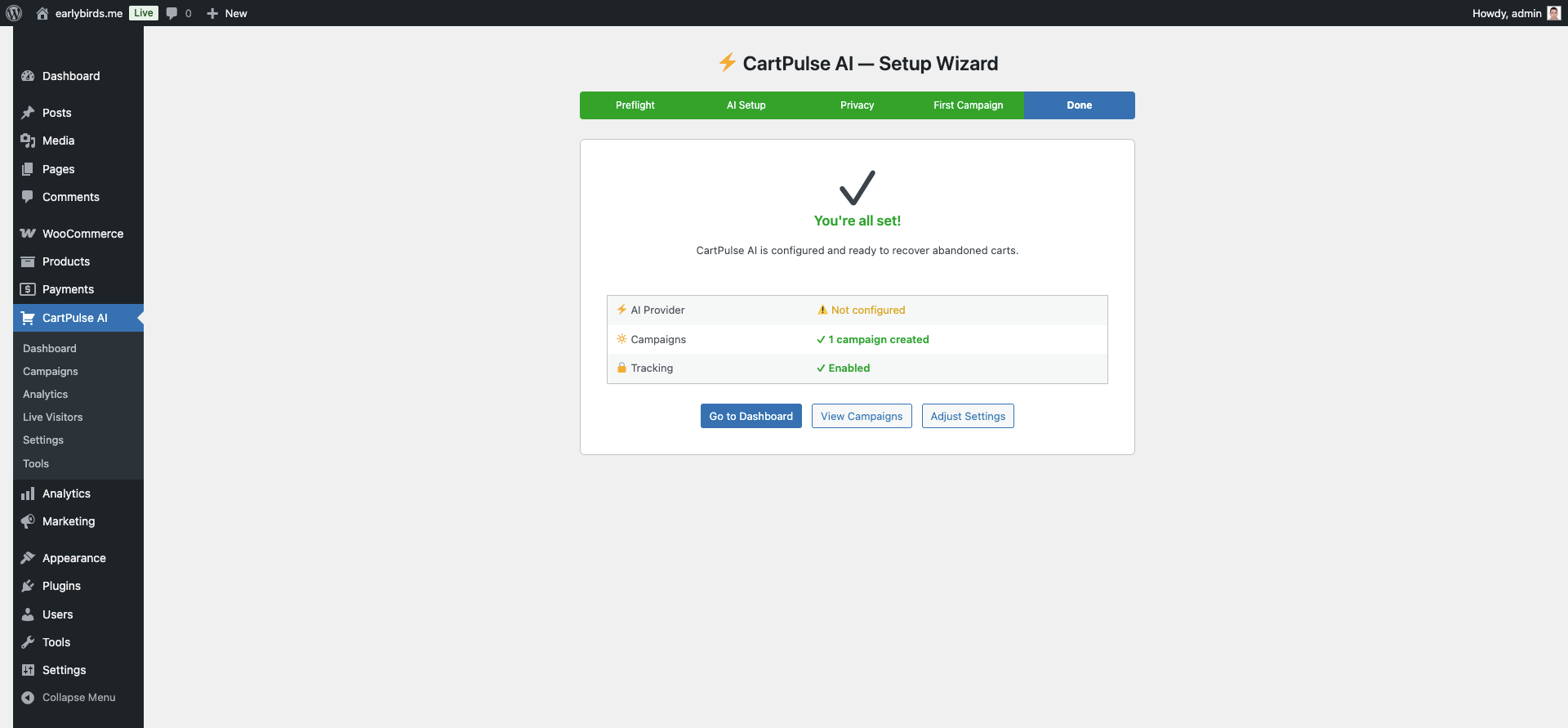 Setup Wizard — Step 5: Done
4. Dashboard
The main dashboard provides a high-level overview of your store’s performance. Access it from CartPulse AI → Dashboard.
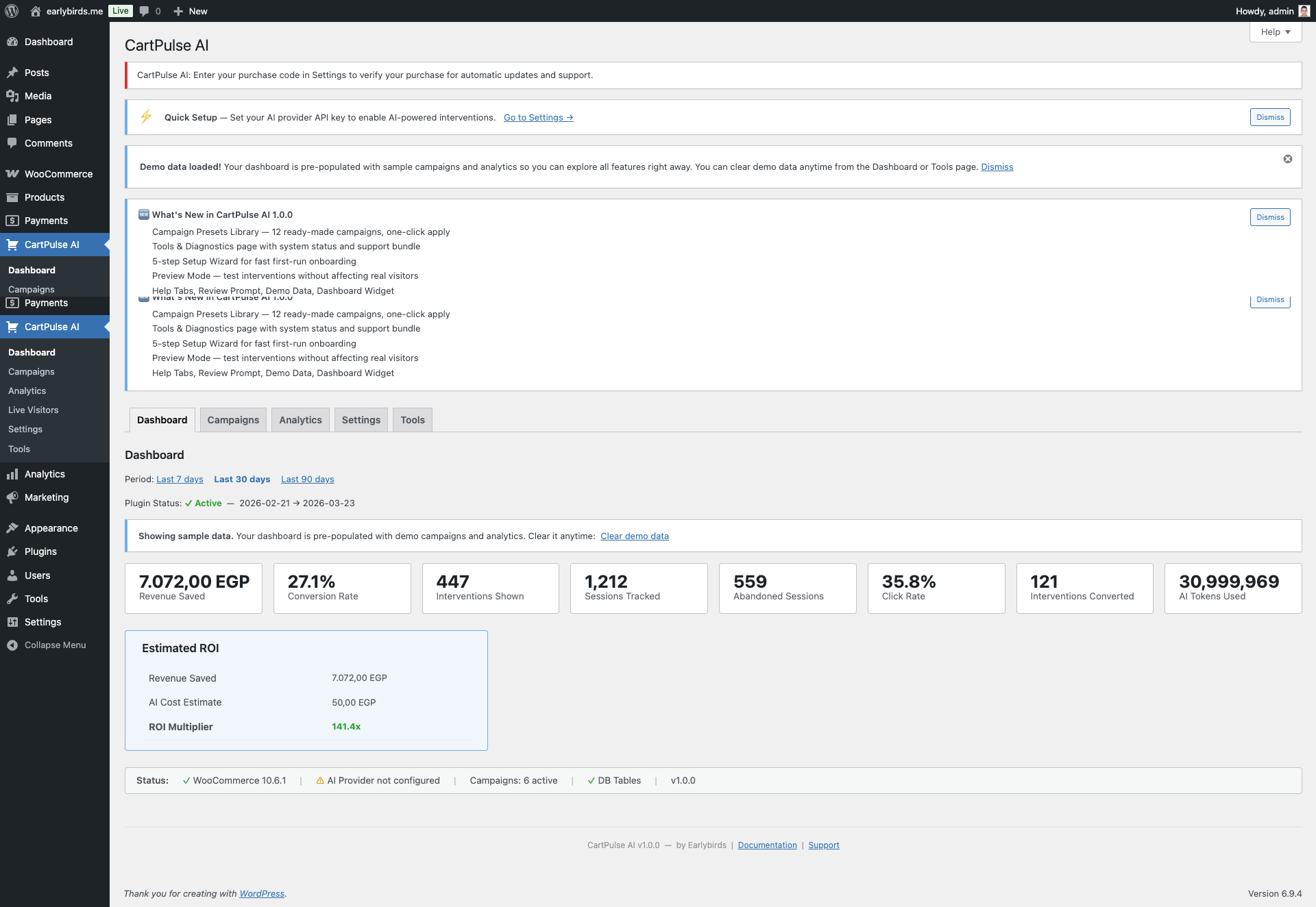 CartPulse AI Dashboard
KPI Cards
Eight stat cards display at the top of the dashboard, each with a colored left border for quick scanning:
| Card | Color | Description |
|---|---|---|
| Revenue Saved | Green | Total revenue attributed to intervention-assisted conversions. |
| Sessions | Blue | Unique visitor sessions tracked in the selected date range. |
| Interventions Shown | Amber | Number of times a campaign intervention was displayed. |
| Conversions | Green | Sessions that saw an intervention and completed a purchase. |
| Conversion Rate | Green | Conversions divided by interventions shown (percentage). |
| Active Campaigns | Blue | Number of currently active campaigns. |
| AI Budget Used | Amber | Current month AI API spend vs. budget limit. |
| ROI | Green | Revenue saved divided by estimated AI API cost. |
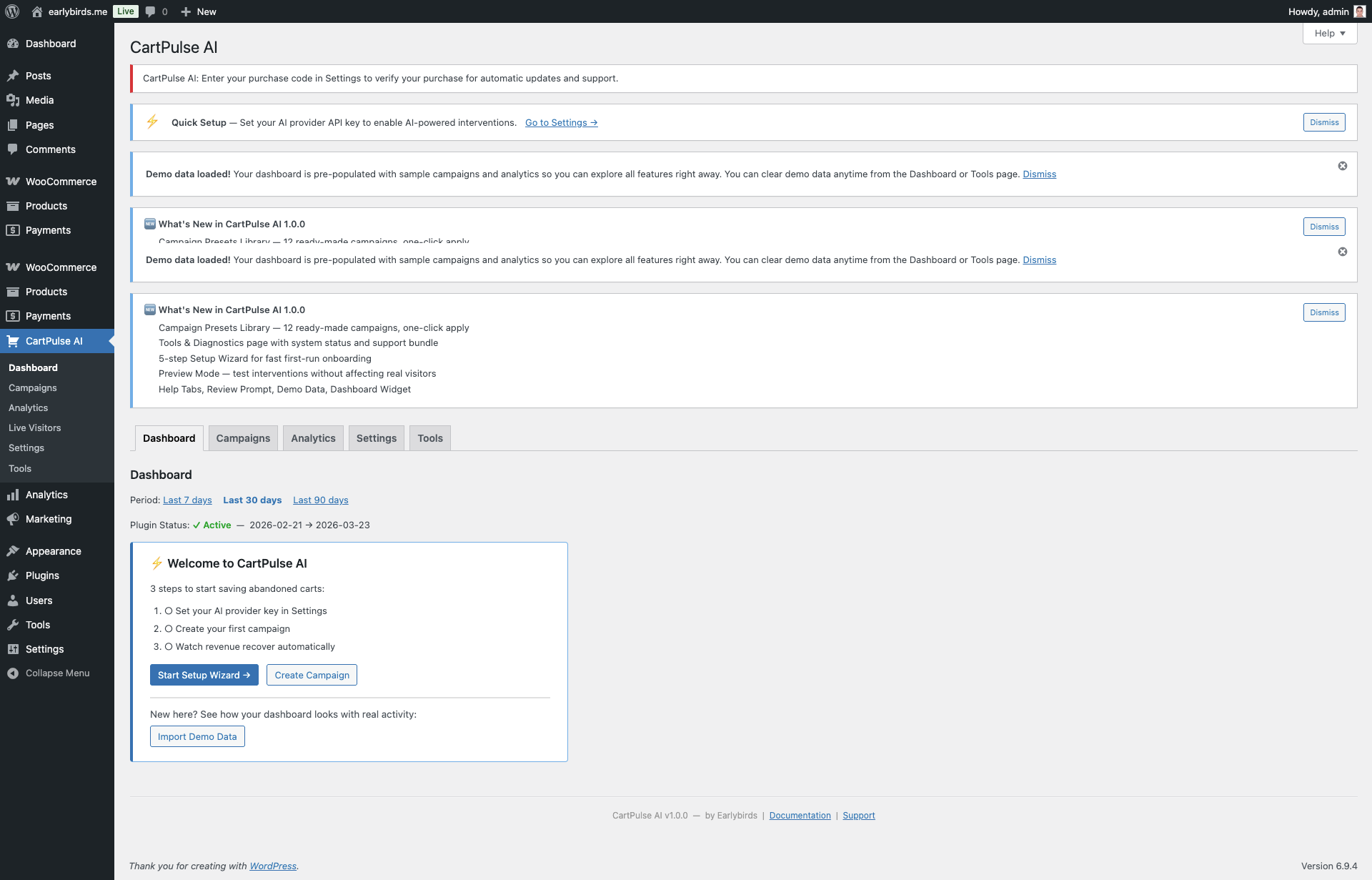 Dashboard with KPI Cards and Analytics
Date Range Picker
Filter all dashboard data by 7-day, 30-day, or 90-day periods using the date range selector in the top-right corner.
Preview Mode
Toggle Preview Mode from the dashboard to test interventions as an admin without affecting live visitors. When enabled, an amber “Preview Mode: ON” indicator appears in the WordPress admin bar on the frontend.
Top Campaigns Table
Shows your top-performing campaigns ranked by conversion rate, with columns for impressions, conversions, revenue, and status.
Demo Data Banner
If demo data is loaded, a dismissible banner appears at the top. Click Clear Demo Data to remove all synthetic data and start fresh with real analytics.
5. Campaign Management
Campaigns are the core building block of CartPulse AI. Each campaign defines when to show an intervention (trigger), what to show (intervention content and design), and who should see it (targeting conditions).
Campaign List
The campaign list page (CartPulse AI → Campaigns) shows all campaigns with:
- Status badges — Pill-shaped indicators: Active (green), Draft (gray), Paused (amber), Scheduled (blue).
- Bulk actions — Activate, pause, or delete multiple campaigns at once.
- Quick filters — Filter by status (all, active, draft, paused).
- Priority — Numeric priority (1–100). Higher-priority campaigns are evaluated first when multiple campaigns match.
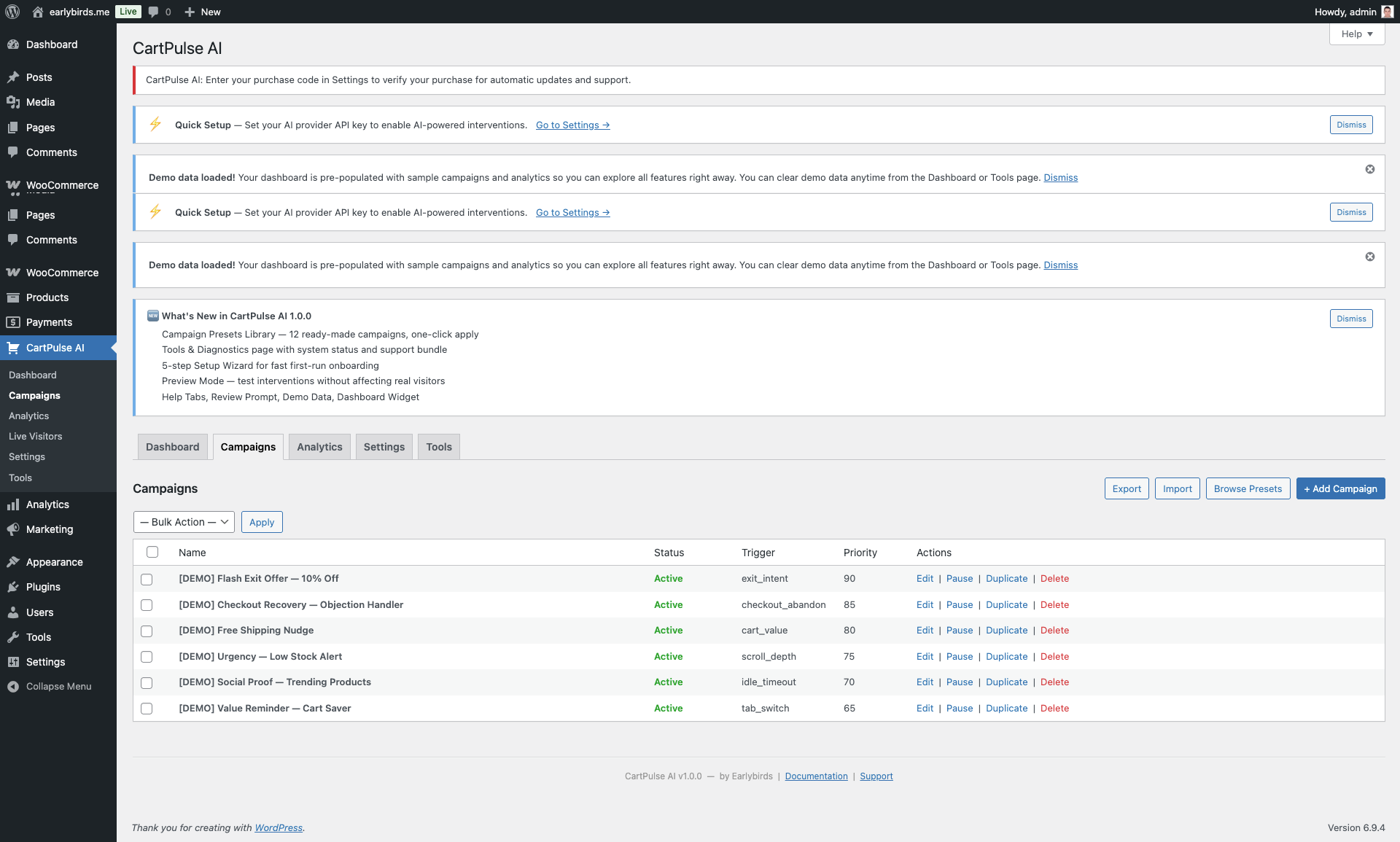 Campaign List View
Creating a Campaign
Click Add New Campaign or apply a preset from the Preset Library. The campaign editor has these sections:
- Name & Status — Campaign name (internal), status (draft/active/paused), priority (1–100).
- Trigger Configuration — See Section 6.
- Intervention Content — See Section 7.
- Coupon Configuration — See Section 9.
- Design Options — Theme, accent color, animation, border radius.
- A/B Testing — See Section 14.
- Schedule — See Section 11.
Campaign Fields Reference
| Field | Type | Description |
|---|---|---|
| name | Text | Internal campaign name (not shown to visitors). |
| status | Select | draft, active, paused. |
| priority | Number | 1–100. Higher = evaluated first. Default: 60. |
| trigger_config | Object | Trigger type, frequency, conditions. See Section 6. |
| intervention | Object | Template type, content mode, headline, body, CTA, design. |
| coupon_config | Object/null | Auto-generated coupon settings or null for no coupon. |
| ab_test_config | Object/null | Variant B content, split ratio. |
| schedule_config | Object/null | Date range, day-of-week, time window. |
Campaign Lifecycle
Campaigns follow a defined lifecycle with four statuses:
| Status | Badge | Description |
|---|---|---|
draft | Gray | Not active. Use for campaigns under construction or imported from presets. Drafts are never evaluated against visitor sessions. |
active | Green | Live and evaluating against visitor sessions. When a visitor matches the trigger and targeting conditions, the intervention fires. |
paused | Amber | Temporarily disabled. Analytics are preserved. Use during seasonal breaks or while investigating issues. |
scheduled | Blue | Will become active when the start date is reached. Set up campaigns in advance for upcoming sales events. |
Campaign Priority & Evaluation Order
When a visitor’s behavior matches multiple campaigns simultaneously, the campaign with the highest priority number wins. Priority ranges from 1 (lowest) to 100 (highest), defaulting to 60.
Duplicating a Campaign
To duplicate a campaign, use the Export → Import workflow:
- Export campaigns from the campaign list (all campaigns export, or use the REST API to export a single campaign).
- Import the JSON file — all campaigns are created as drafts.
- Delete any campaigns you don’t need from the import.
Alternatively, create a new campaign from a Preset that matches your use case and customize from there.
Deleting a Campaign
Deleting a campaign permanently removes its configuration and A/B test settings. Analytics data (intervention logs, conversions, revenue) is preserved for historical reporting. Pending coupons generated by the campaign remain in WooCommerce until they expire or are manually deleted.
6. Trigger Configuration
Triggers define the behavioral signal that causes a campaign’s intervention to fire. Each campaign has exactly one trigger type.
Trigger Types
| Type | Slug | Description |
|---|---|---|
| Exit Intent | exit_intent | Fires when the mouse cursor leaves the viewport toward the browser bar (desktop) or rapid scroll-up (mobile). |
| Idle Timeout | idle_timeout | Fires after N seconds of no interaction while items are in the cart. Configure timeout_seconds. |
| Scroll Depth | scroll_depth | Fires when the visitor scrolls past a configured percentage of the page. Configure scroll_pct (e.g., 60). |
| Tab Switch | tab_switch | Fires when the visitor switches to a different browser tab (comparison shopping signal). |
| Cart Value | cart_value | Fires when the cart total exceeds a threshold. Configure cart_value_threshold. |
| Checkout Abandon | checkout_abandon | Fires when the visitor shows signs of leaving the checkout page without completing the order. |
| URL Pattern | url_pattern | Fires on pages matching a URL pattern (e.g., /product/sale-*). |
| Referrer Match | referrer_match | Fires when the visitor arrived from a specific referrer domain (e.g., google.com). |
| Cart Contains | cart_contains | Fires when the cart contains specific product IDs or category slugs. |
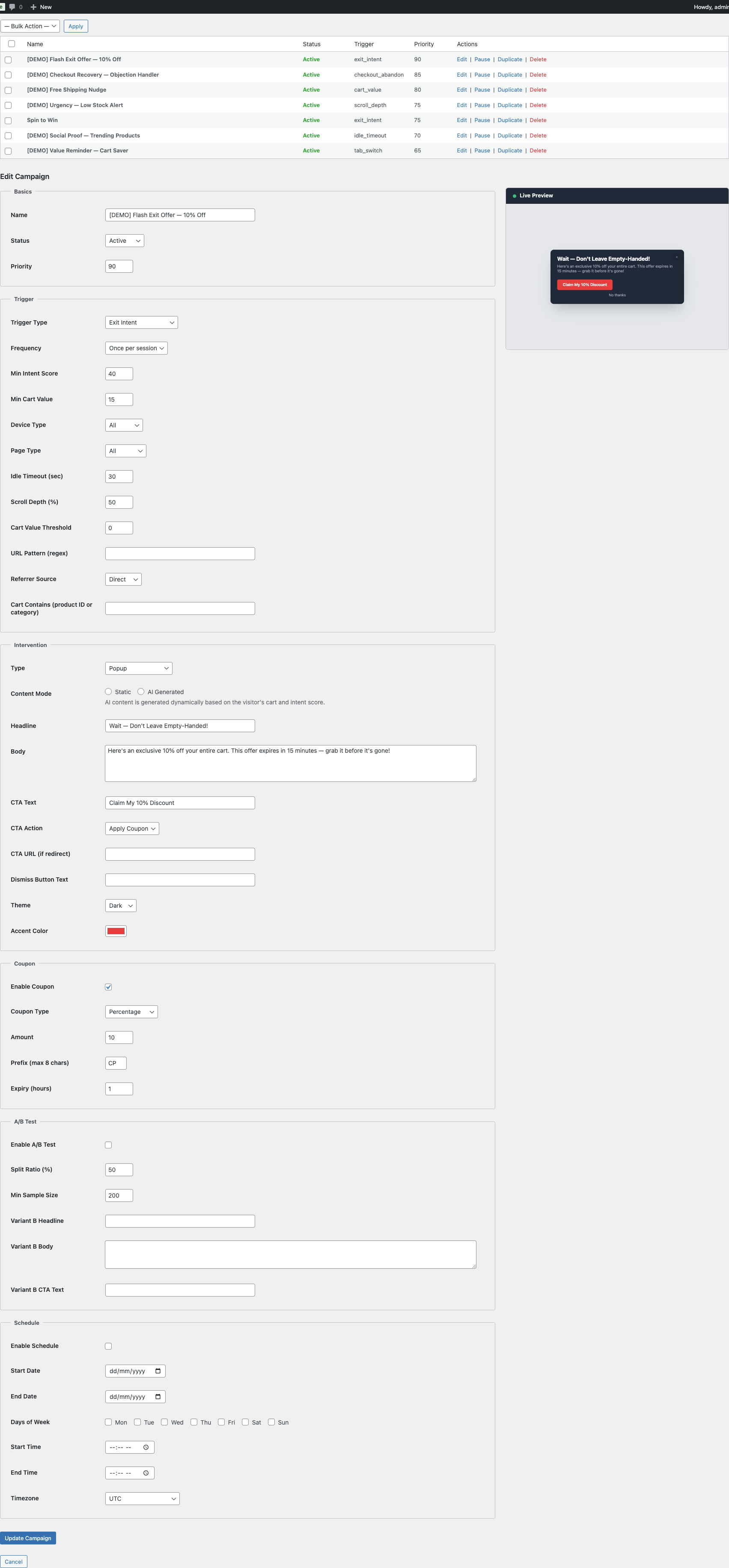 Trigger: Exit Intent
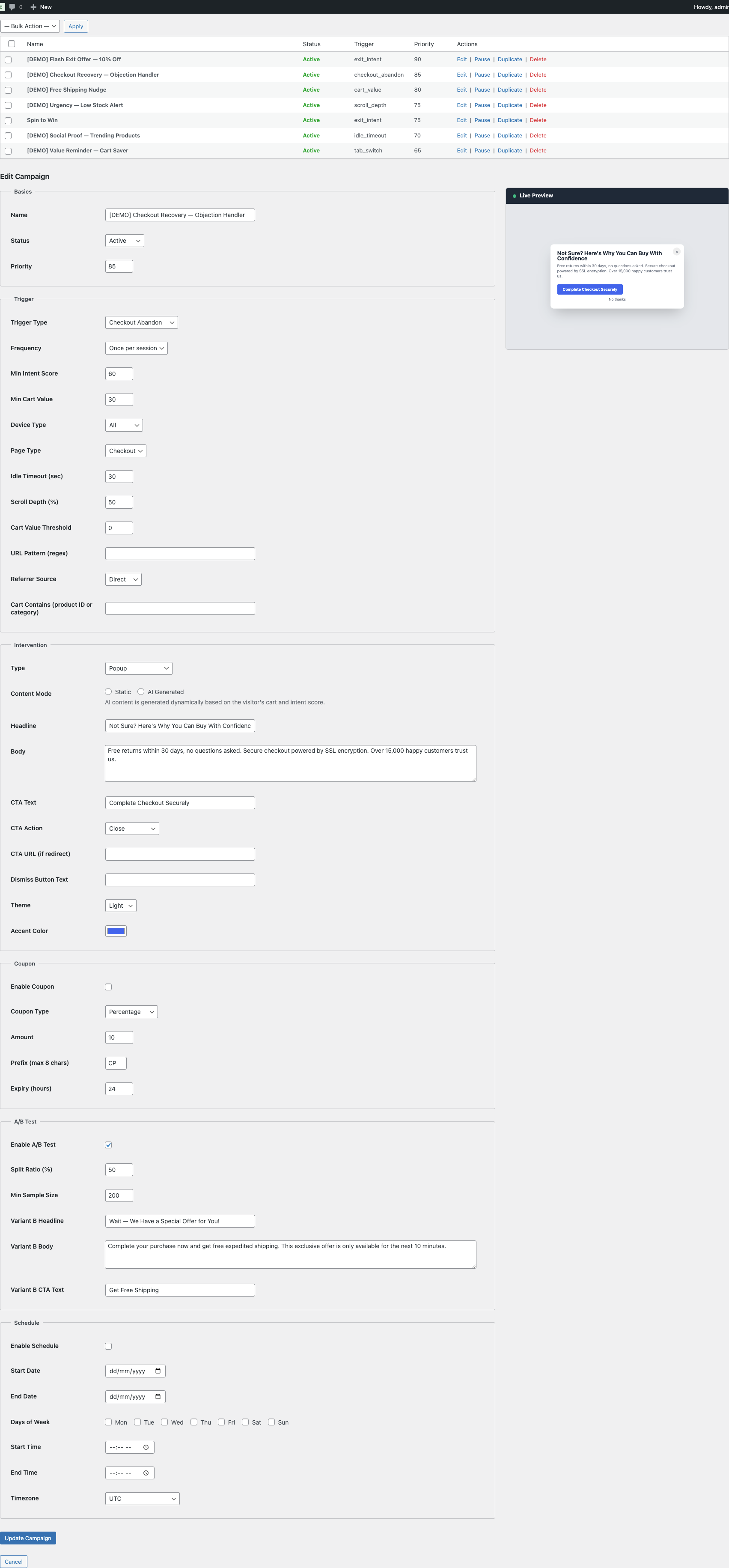 Trigger: Checkout Abandon
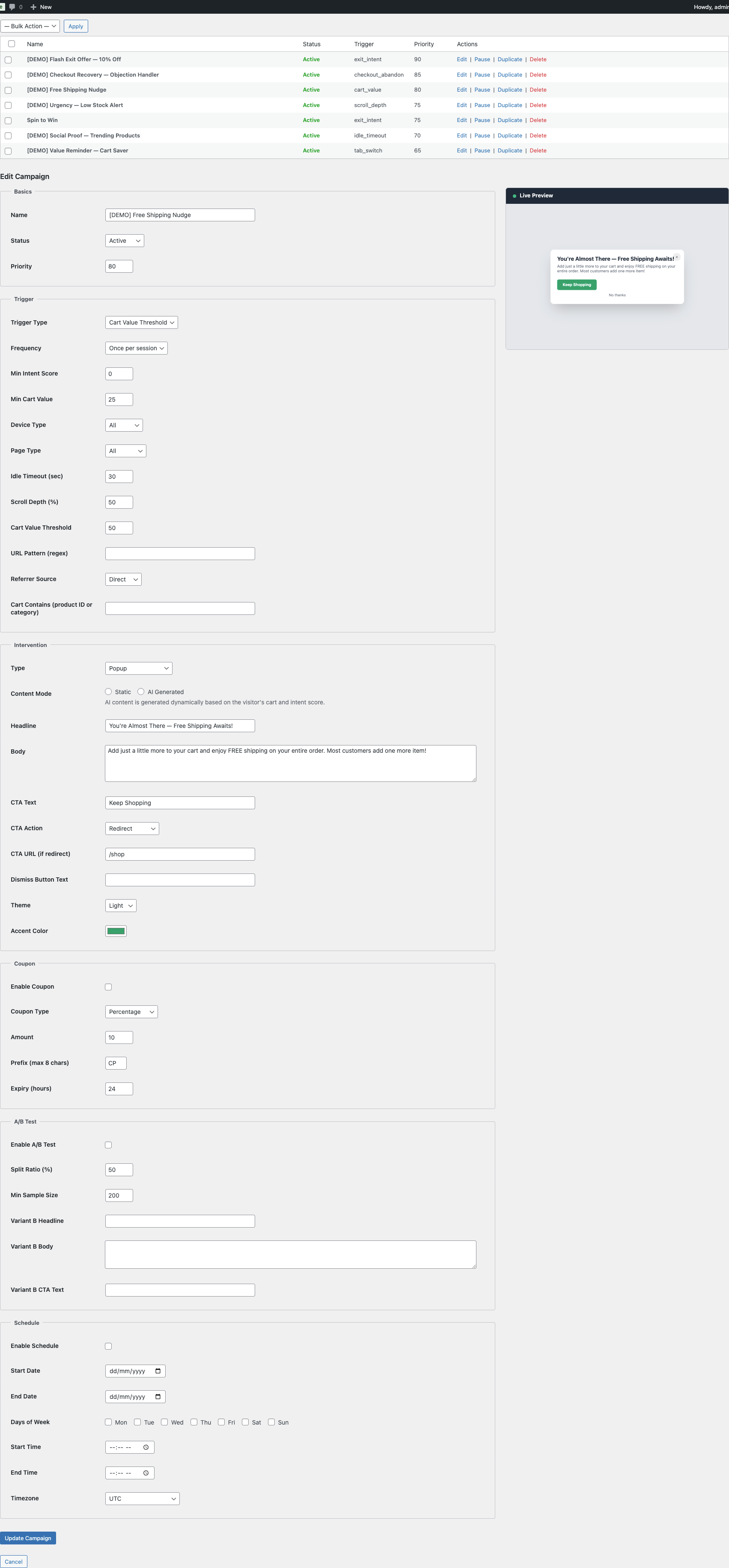 Trigger: Cart Value
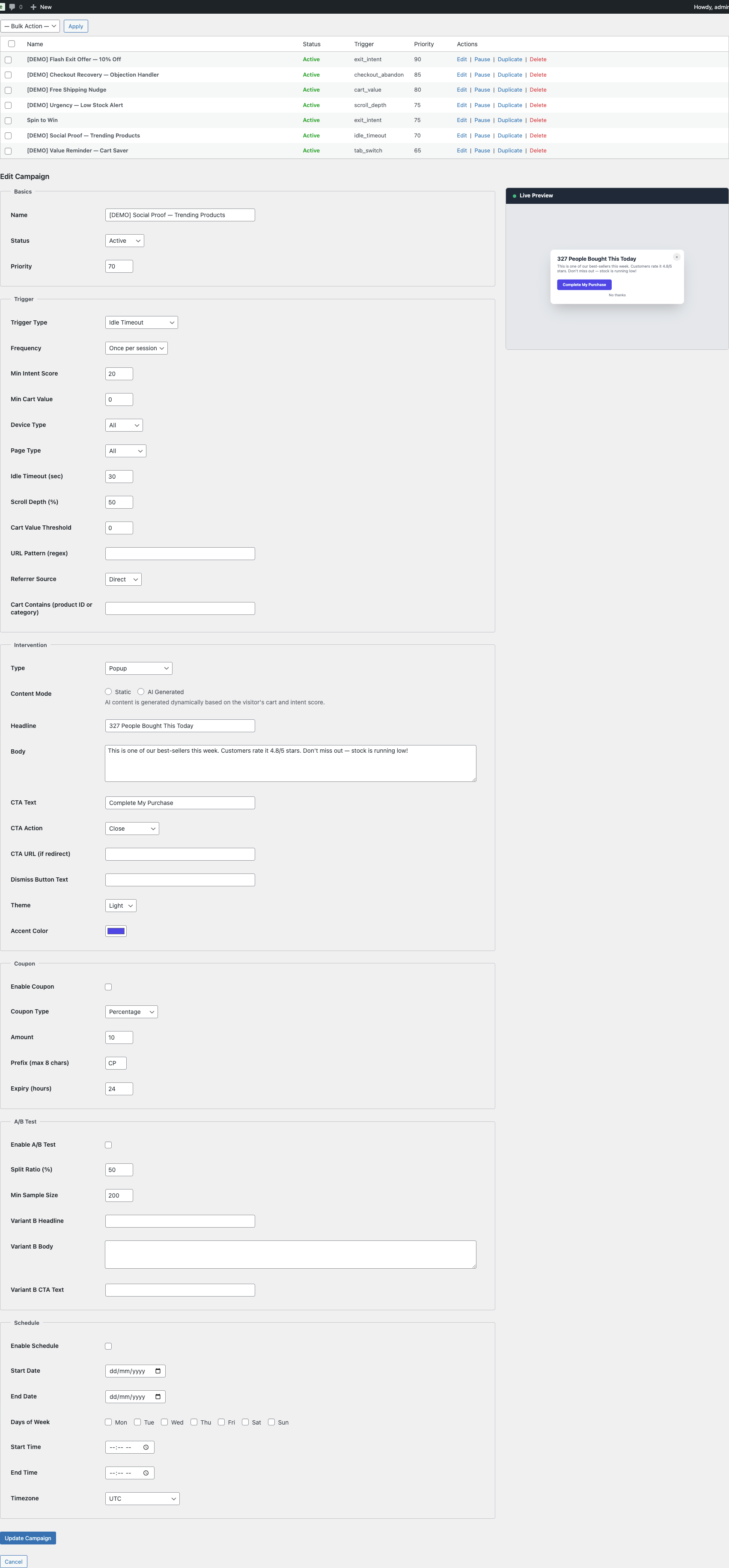 Trigger: Idle Timeout
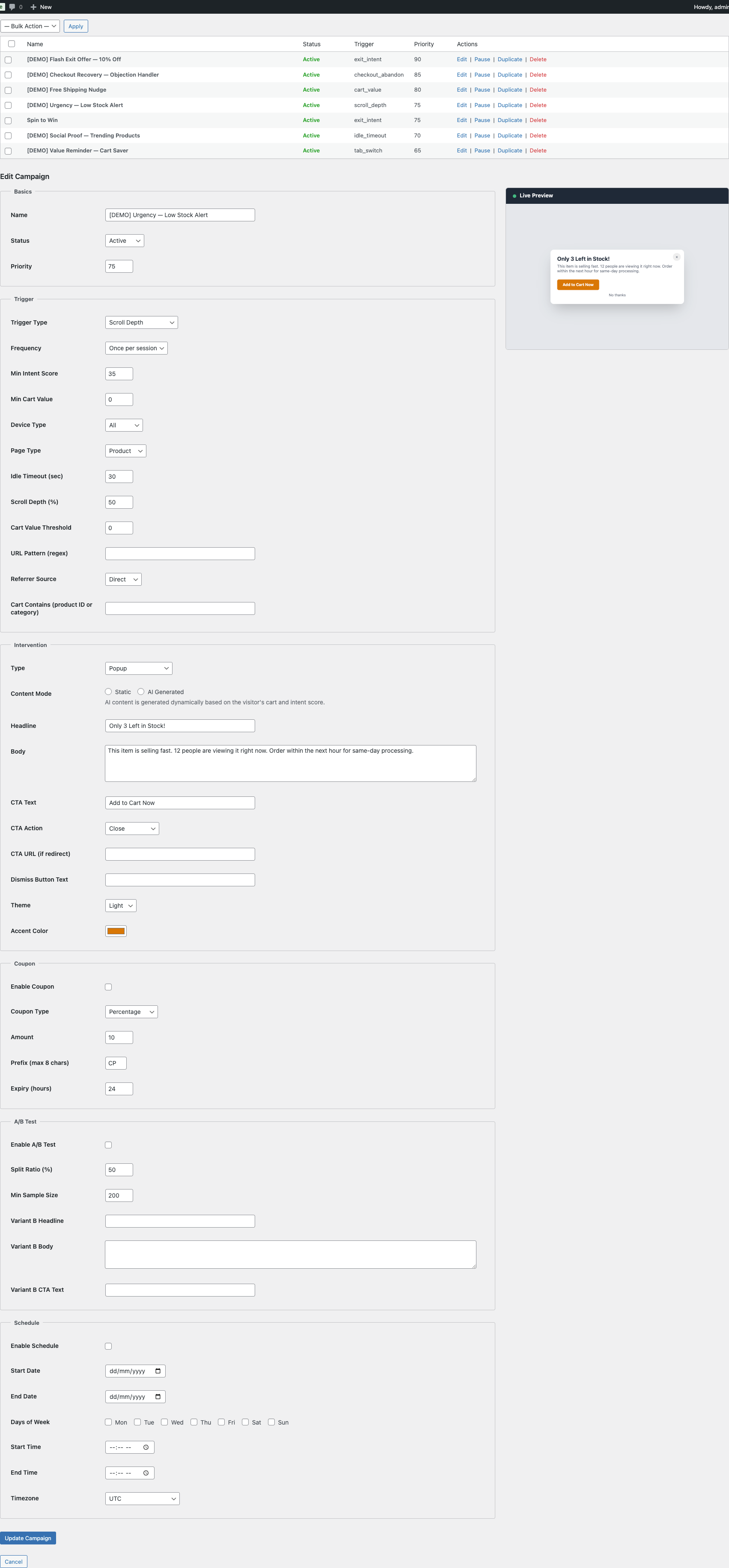 Trigger: Scroll Depth
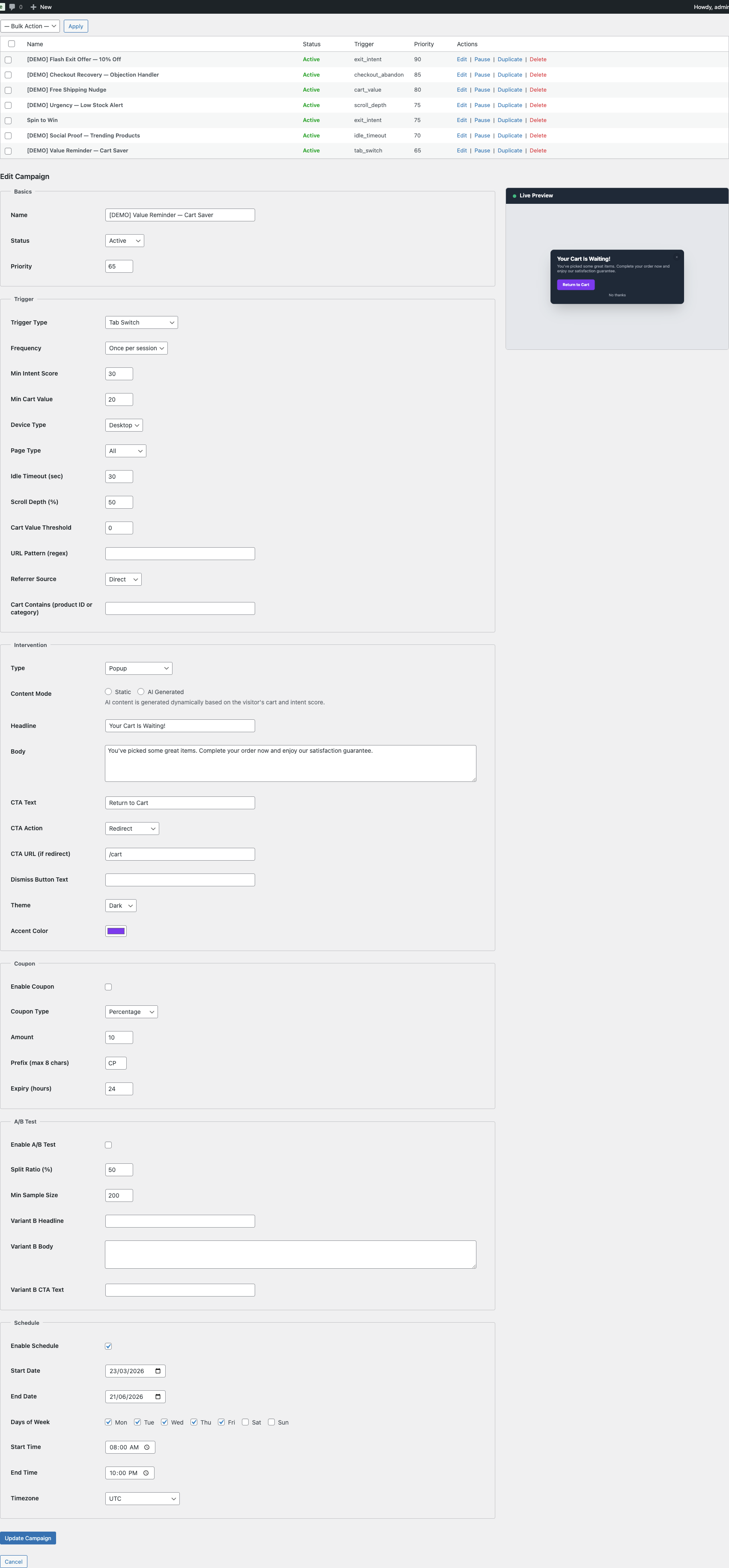 Trigger: Tab Switch
Frequency Options
| Frequency | Description |
|---|---|
always | Fire every time the trigger condition is met. |
once_per_session | Fire only once per visitor session. |
once_per_day | Fire at most once per calendar day per visitor. |
once_per_visitor | Fire only once ever per visitor (cookie-based). |
Targeting Conditions
Each trigger supports additional conditions that must be met alongside the trigger event:
| Condition | Description |
|---|---|
min_intent_score | Minimum purchase-intent score (0–100) the visitor must have. |
min_cart_value | Minimum cart value (in store currency) before the trigger fires. |
device_type | all, desktop, or mobile. |
page_type | all, product, category, cart, checkout, shop, or other. |
Trigger Configuration Examples
Exit Intent with High-Value Cart
{
  "trigger_type": "exit_intent",
  "frequency": "once_per_session",
  "min_cart_value": 50,
  "min_intent_score": 30,
  "device_type": "desktop",
  "page_type": "all"
}
Fires once per session when a desktop visitor with $50+ in their cart moves their mouse toward the browser bar. Requires at least 30 intent score to avoid triggering on casual visitors.
Checkout Abandonment Recovery
{
  "trigger_type": "checkout_abandon",
  "frequency": "once_per_session",
  "min_cart_value": 0,
  "device_type": "all",
  "page_type": "checkout"
}
Fires when the visitor shows signs of leaving the checkout page (exit intent or idle timeout on checkout). This is a high-value trigger — the visitor was already in the purchasing flow.
Free Shipping Nudge on Cart Page
{
  "trigger_type": "cart_value",
  "cart_value_threshold": 75,
  "frequency": "once_per_session",
  "page_type": "cart"
}
Fires when the cart total exceeds $75 but hasn’t reached your free shipping threshold. Use with a top bar intervention and the {shipping_gap} merge tag.
Mobile vs. Desktop Exit Intent
Exit intent detection works differently across devices:
| Device | Detection Method |
|---|---|
| Desktop | Mouse cursor leaves the viewport toward the top of the browser window (address bar area). |
| Mobile | Rapid upward scroll combined with a pause (back-button behavior pattern), or the visibilitychange event when the tab becomes hidden. |
Desktop detection is generally more precise. For mobile, consider using idle_timeout or tab_switch triggers as alternatives.
7. Intervention Content & Design
Template Types
| Type | Slug | Description |
|---|---|---|
| Popup | popup | Centered modal overlay with headline, body, CTA buttons, and optional close button. |
| Slide-in | slide_in | Small panel that slides in from the bottom-right corner of the viewport. |
| Top Bar | top_bar | Full-width notification strip at the top of the page. |
| Bottom Bar | bottom_bar | Full-width notification strip at the bottom of the page. |
| Fullscreen | fullscreen | Full-viewport overlay with centered content and background dimming. |
| Inline | inline | Embedded directly in the page content (non-overlay). |
| Spin Wheel | spin_wheel | Gamified spinning wheel with configurable prize slices. See Section 15. |
| Email Capture | email_capture | Popup with email input form to capture visitor emails for cart recovery. See Section 15b. |
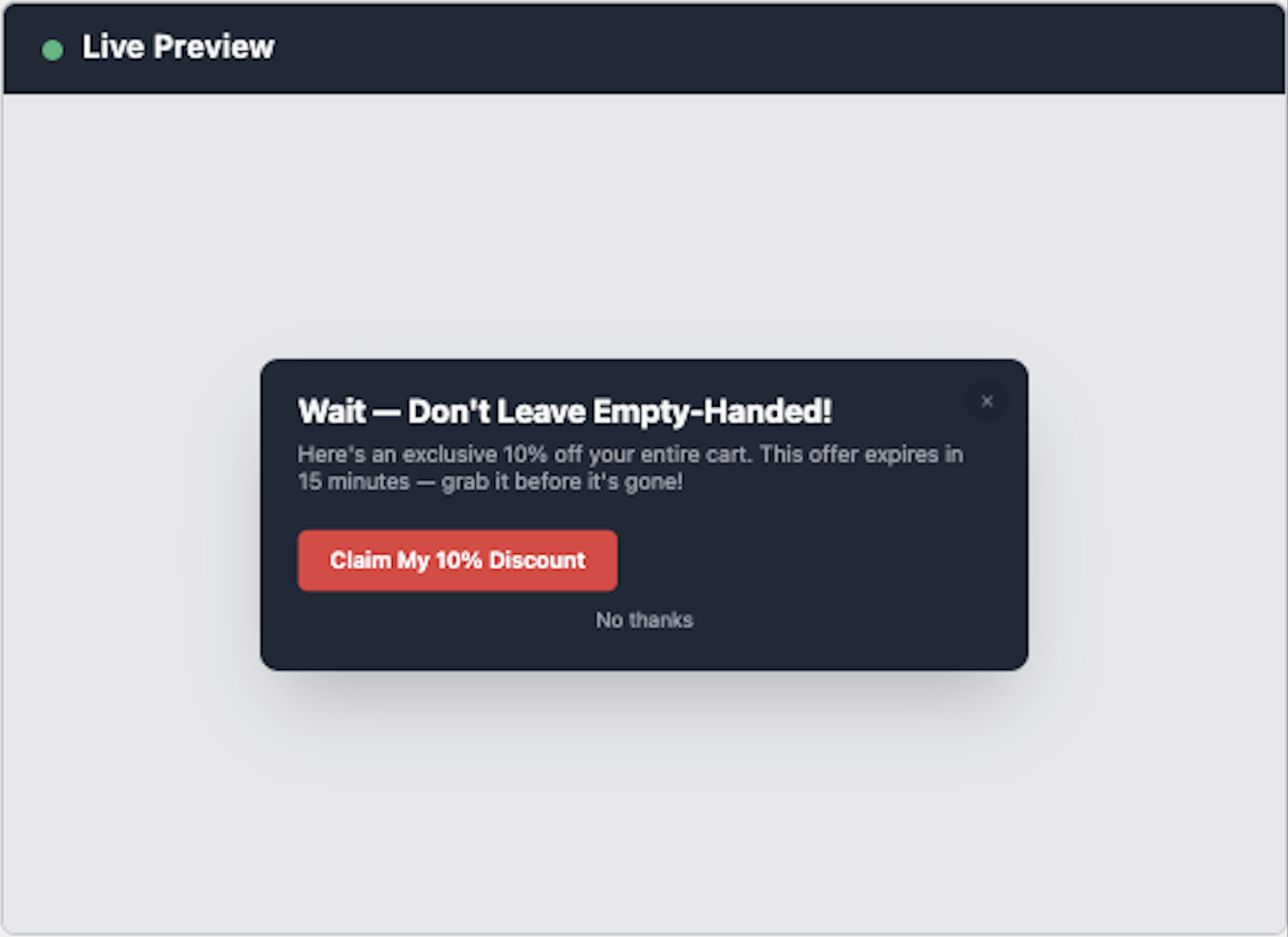 Intervention: Exit Intent Popup
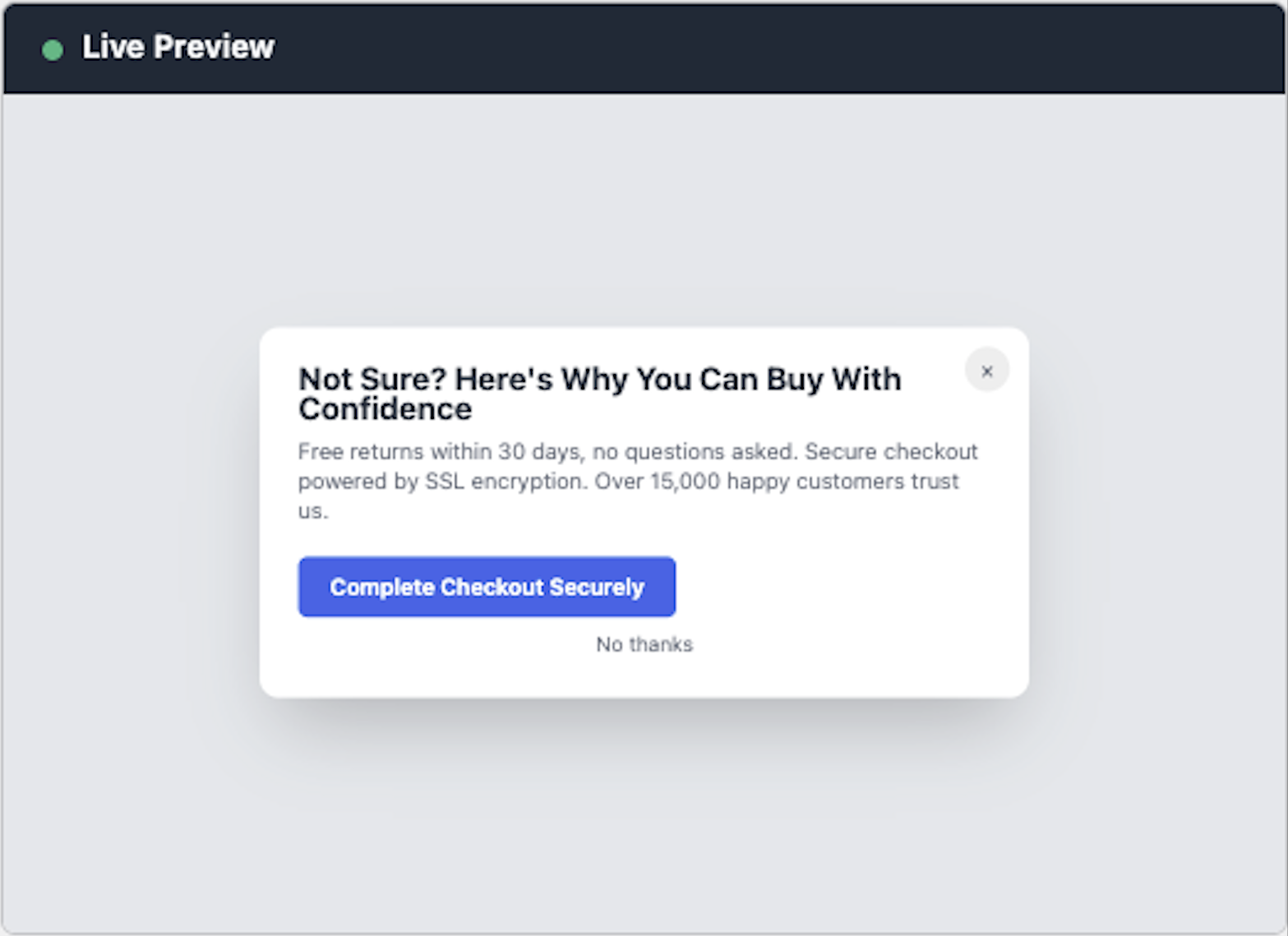 Intervention: Checkout Abandon
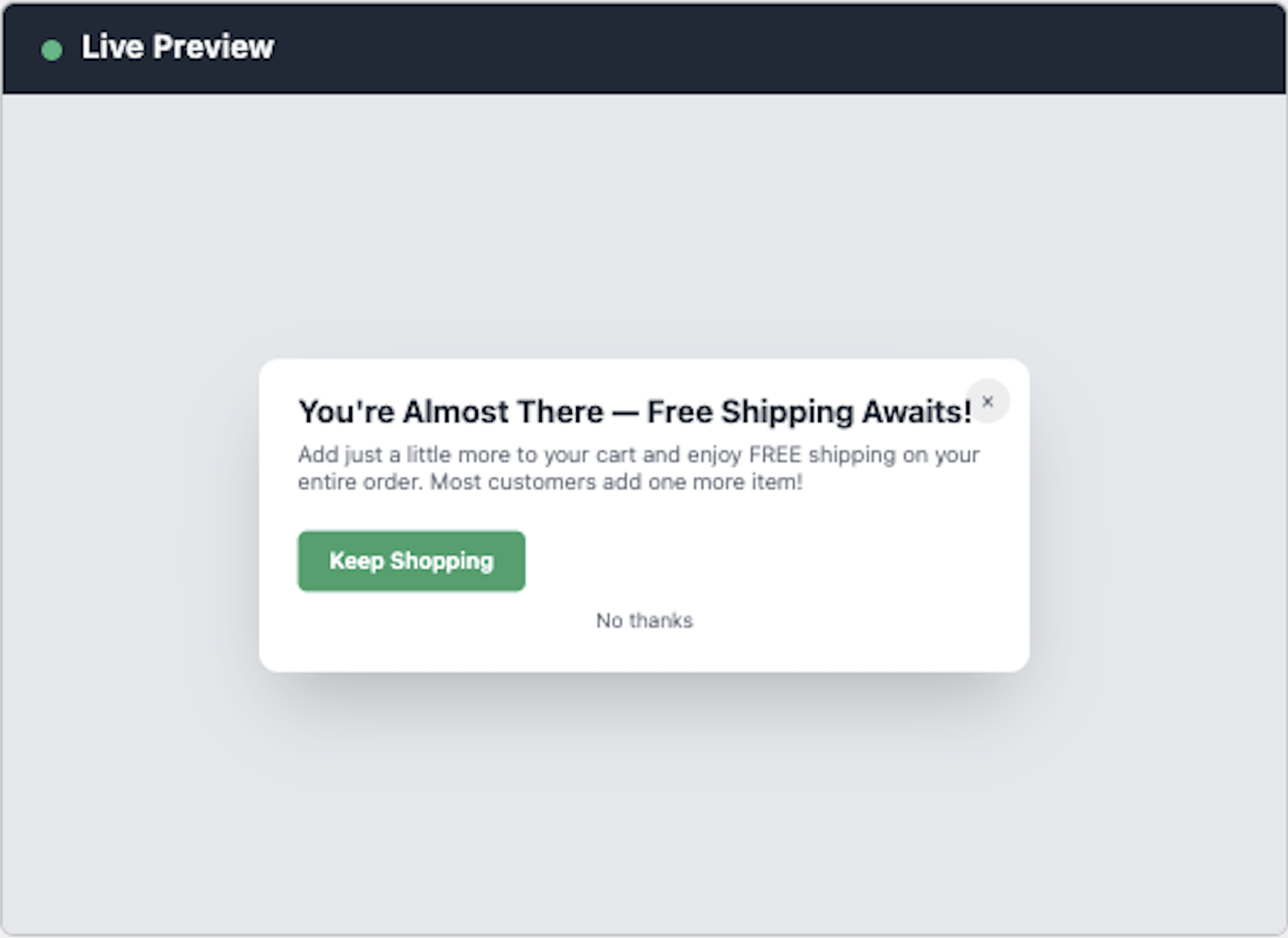 Intervention: Cart Value
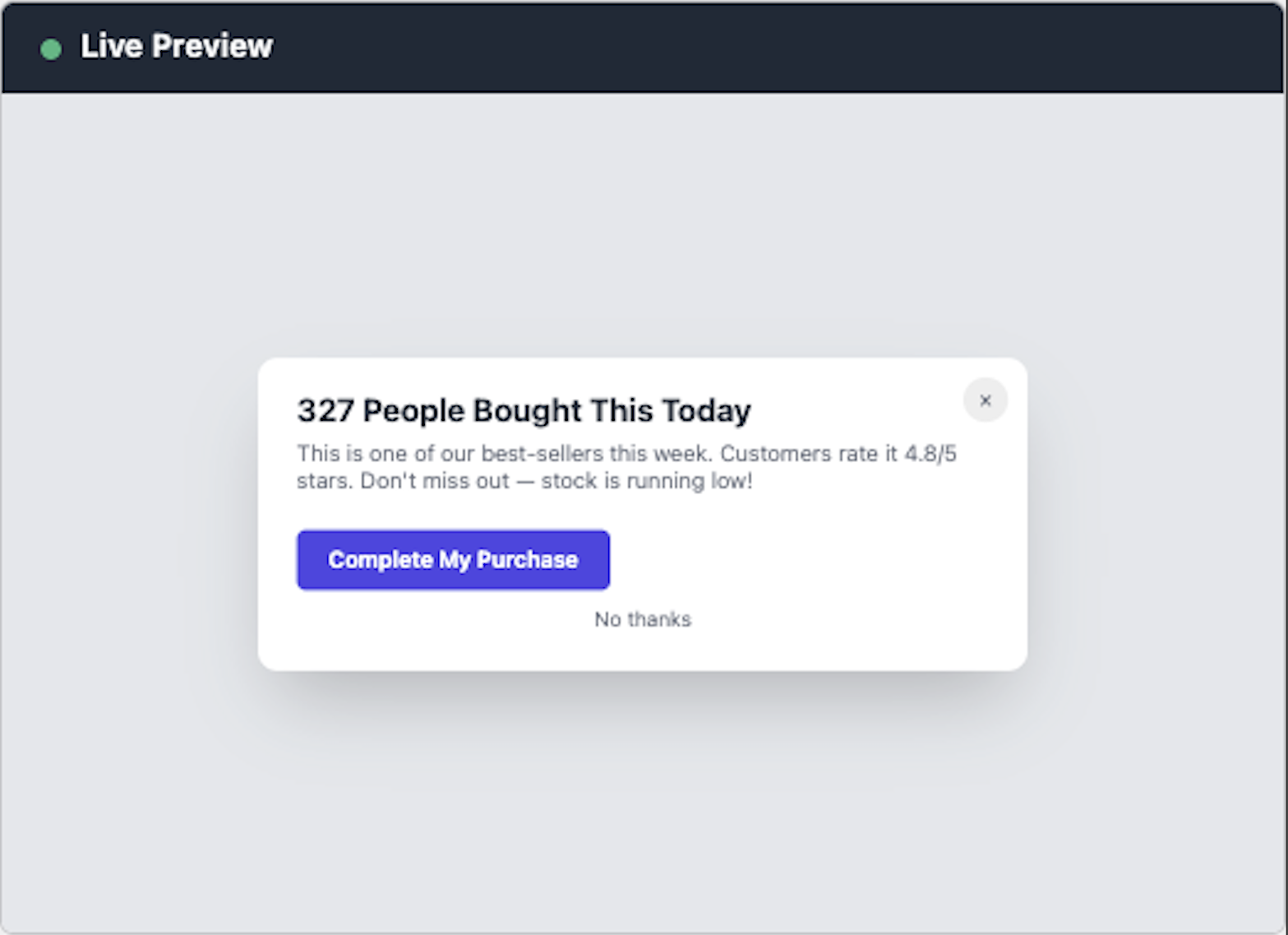 Intervention: Idle Timeout
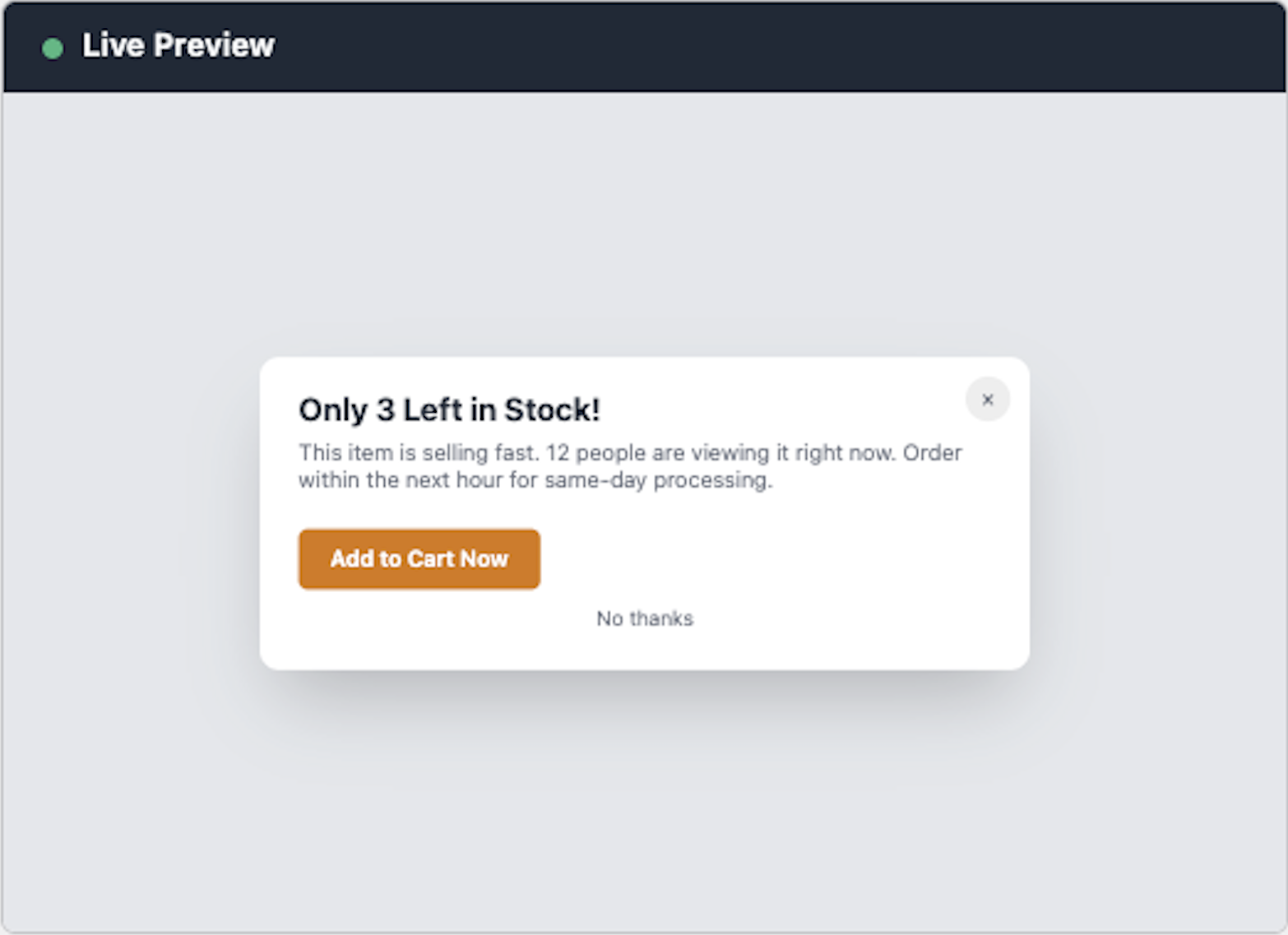 Intervention: Scroll Depth
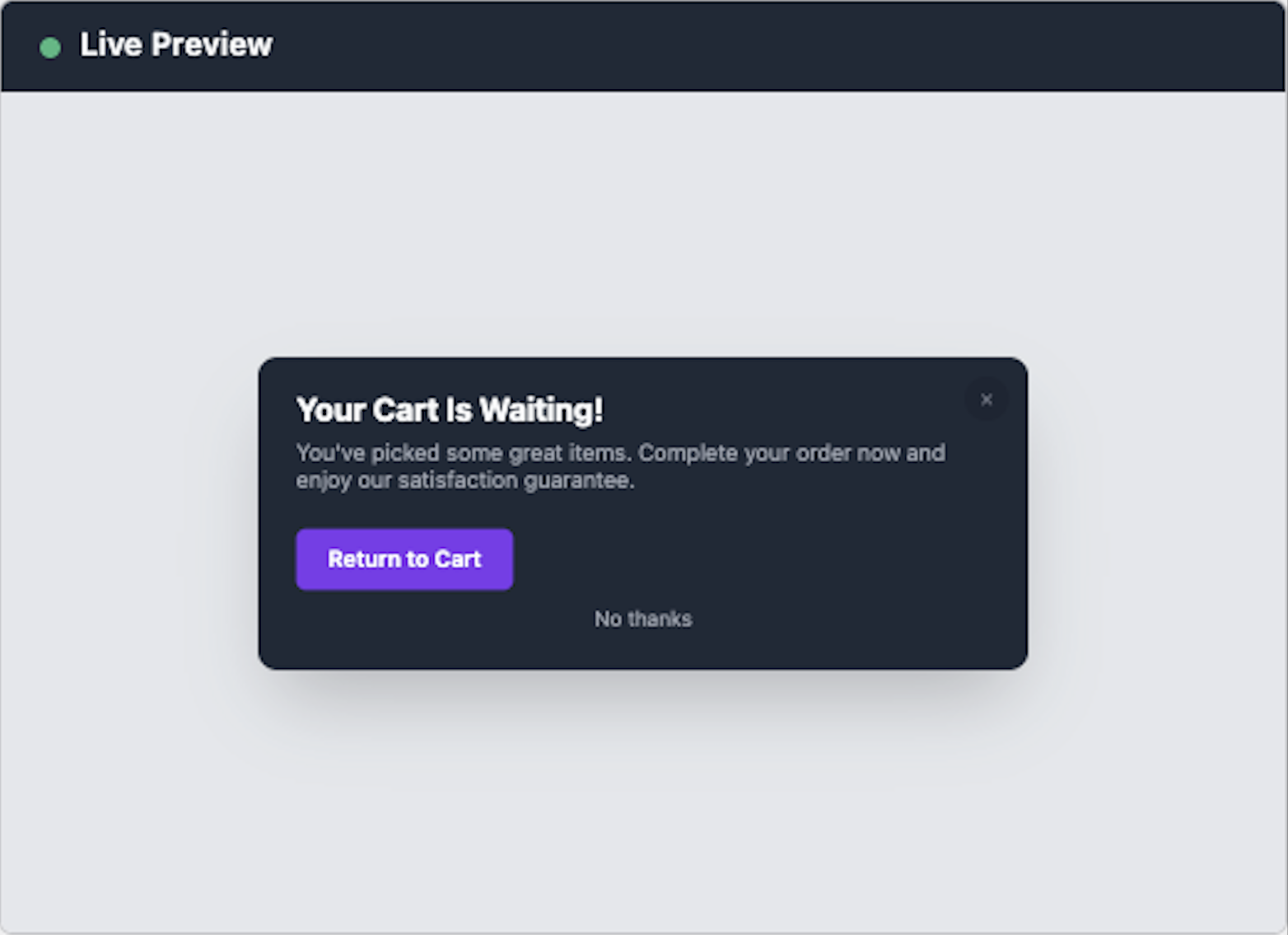 Intervention: Tab Switch
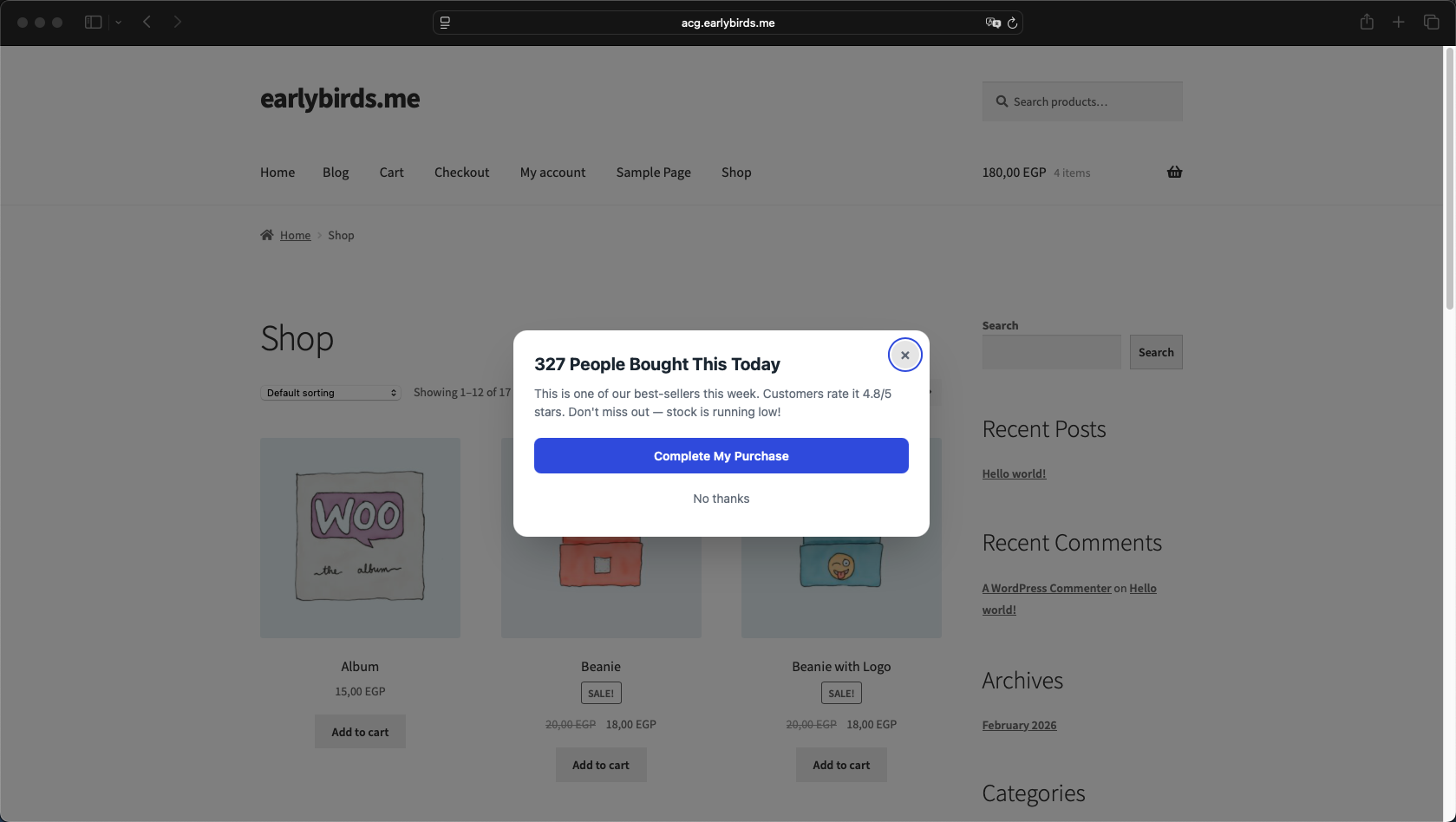 Storefront Intervention (Live)
Content Mode
- Static (
content_mode: static) — You write the headline, body, and CTA text manually. Use merge tags for dynamic personalization. Works without an AI provider. - AI-Generated (
content_mode: ai_generated) — The AI provider generates headline and body text based on cart context, store name, configured tone, and campaign instructions. Your static text serves as a fallback if the AI budget is reached or the API is unavailable.
Content Fields
| Field | Description |
|---|---|
headline | Main heading text displayed at the top of the intervention. |
body | Body copy supporting the headline. |
cta_text | Primary call-to-action button label. |
cta_action | What happens on CTA click: apply_coupon, redirect, close, spin, or email_capture. |
cta_url | URL to redirect to (when cta_action is redirect). Defaults to cart page. |
secondary_cta_text | Optional dismiss button text (e.g., “No thanks”). |
Design Options
| Option | Values | Description |
|---|---|---|
| Theme | light, dark, brand | Color scheme for the intervention panel. |
| Accent Color | Hex color | Applied to CTA buttons and borders. |
| Border Radius | Pixels | Corner rounding for the intervention container. |
| Overlay Opacity | 0–1 | Background dimming for popup/fullscreen types. |
| Animation | fade, fade-up, slide, slide-left, bounce | Entry animation when the intervention appears. |
8. Merge Tags Reference
Merge tags allow static templates to display dynamic, real-time data from your store. Insert them in headline, body, or CTA text fields.
| Tag | Description | Example Output |
|---|---|---|
{cart_total} | Current cart total in store currency. | $89.99 |
{cart_count} | Number of items in the cart. | 3 |
{product_name} | Name of the first product in the cart. | Premium Wireless Headphones |
{discount_amount} | The coupon discount value (from coupon config). | 10% |
{savings_display} | Calculated savings amount in currency. | $9.00 |
{expiry_hours} | Hours until the coupon expires. | 24 |
{recent_purchases} | Real WooCommerce order count in the last 24 hours. | 47 |
{recent_buyers} | Unique customers who ordered in the last 24 hours. | 23 |
{product_rating} | Average product rating (from WooCommerce reviews). | 4.7 |
{review_count} | Number of product reviews. | 128 |
{store_name} | Your store/site name from WordPress settings. | My Store |
{shipping_gap} | Amount remaining to reach free shipping threshold. | $11.01 |
{shipping_threshold} | Free shipping threshold from plugin settings. | $100.00 |
{coupon_code} | The auto-generated coupon code. | FLASH-A1B2C3 |
{recent_purchases}, {recent_buyers}, {product_rating}, {review_count}) pull real data from your WooCommerce orders and product meta. Data is cached for 15 minutes.9. Coupon Configuration
Campaigns can auto-generate unique WooCommerce coupons for discount-based interventions. Configure the coupon in the campaign editor under Coupon Settings.
| Field | Description |
|---|---|
| Discount Type | percent (percentage off), fixed (fixed amount off), or free_shipping. |
| Amount | Discount value (e.g., 10 for 10% or $10). |
| Prefix | Coupon code prefix (e.g., FLASH produces FLASH-A1B2C3). |
| Expiry (hours) | Hours until the coupon expires after creation (1–168). Default: 24. |
How It Works
- When an intervention is shown, the plugin creates a unique WooCommerce coupon with the configured discount type, amount, and expiry.
- The coupon code is injected into the intervention via the
{coupon_code}merge tag or the CTA “Apply Coupon” action. - The coupon is a standard WooCommerce coupon — it appears in Marketing → Coupons and works with all WooCommerce checkout flows.
- Expired coupons are automatically cleaned up by a daily cron job (
earlybirds_cp_cleanup_coupons).
10. Live Campaign Preview
The campaign editor includes a real-time preview panel on the right side. It uses the same CSS and HTML as the storefront, scaled to 65% for a desktop-like viewport.
What Updates Live
- Headline, body, and CTA text
- Intervention type (popup, slide-in, bar, fullscreen, spin wheel)
- Theme (light, dark, brand)
- Accent color
- Animation style
- Spin wheel slice configuration
Supported Template Types
All 7 template types are supported in the preview. The spin wheel shows a mini conic-gradient preview that updates as you add/remove slices or change colors.
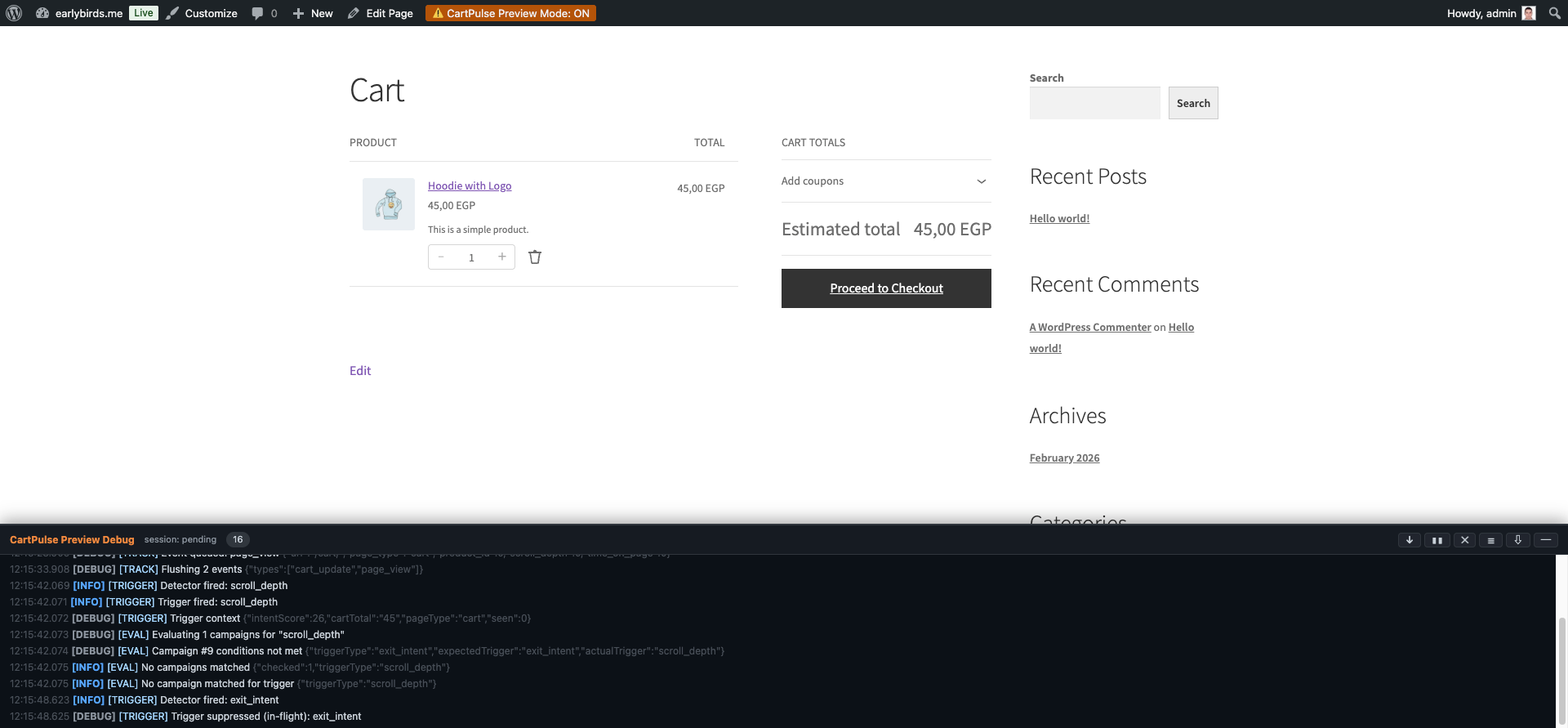 Live Campaign Preview with Debug Panel
11. Campaign Scheduling
Campaigns can be scheduled to run during specific time periods. Configure scheduling in the campaign editor under Schedule.
| Field | Description |
|---|---|
| Start Date | Campaign becomes eligible to fire on this date (inclusive). Leave blank for “immediately”. |
| End Date | Campaign stops firing after this date. Leave blank for “indefinitely”. |
| Day of Week | Array of days (Mon–Sun) when the campaign is active. Leave empty for all days. |
| Time Window | Start and end time (HH:MM, 24-hour) within each active day. Leave blank for all-day. |
Campaigns outside their scheduled window are silently skipped without changing their status. An hourly cron job (earlybirds_cp_process_schedules) evaluates schedule rules.
12. Campaign Import / Export
Exporting
From the campaign list, click Export Campaigns. This downloads a JSON file containing all campaigns with IDs stripped and statuses set to draft. The file is portable and can be imported on any CartPulse AI installation.
Importing
- Click Import Campaigns on the campaign list page.
- Select a JSON file previously exported from CartPulse AI.
- The plugin validates the file structure and creates all campaigns as drafts.
- Review and activate imported campaigns individually.
13. Preset Library
CartPulse AI includes 12 ready-made campaign presets covering the most common abandonment recovery scenarios. Access them from Campaigns → Presets.
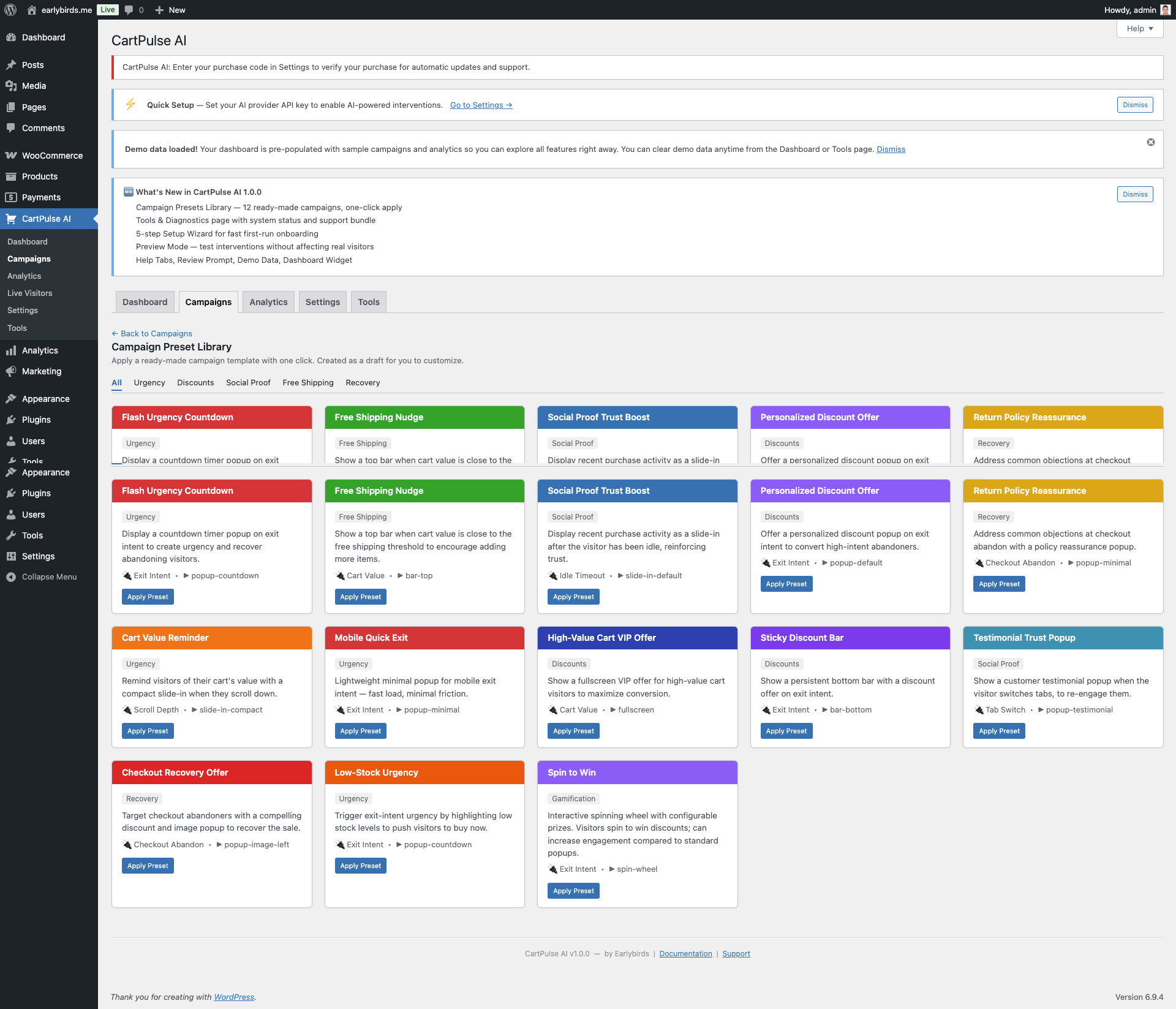 Campaign Preset Library
| # | Preset Name | Category | Trigger | Type | Description |
|---|---|---|---|---|---|
| 1 | Flash Urgency Countdown | Urgency | Exit Intent | Popup | Countdown timer popup with 10% coupon on exit intent. |
| 2 | Free Shipping Nudge | Free Shipping | Cart Value | Top Bar | Shows how close the visitor is to free shipping. |
| 3 | Social Proof Trust Boost | Social Proof | Idle Timeout | Slide-in | Recent purchase activity slide-in after 30s idle. |
| 4 | Personalized Discount Offer | Discounts | Exit Intent | Popup | AI-generated personalized discount with 10% coupon. |
| 5 | Return Policy Reassurance | Recovery | Checkout Abandon | Popup | Addresses objections with policy reassurance. |
| 6 | Cart Value Reminder | Urgency | Scroll Depth | Slide-in | Reminds visitors of items in cart at 60% scroll. |
| 7 | Mobile Quick Exit | Urgency | Exit Intent | Popup | Lightweight popup optimized for mobile exit. |
| 8 | High-Value Cart VIP Offer | Discounts | Cart Value | Fullscreen | AI-generated VIP discount for carts over $100. |
| 9 | Sticky Discount Bar | Discounts | Exit Intent | Bottom Bar | Persistent discount code in bottom bar (desktop). |
| 10 | Testimonial Trust Popup | Social Proof | Tab Switch | Popup | Customer testimonial shown when tab switching. |
| 11 | Checkout Recovery Offer | Recovery | Checkout Abandon | Popup | AI-generated 15% discount for checkout abandoners. |
| 12 | Spin to Win | Gamification | Exit Intent | Spin Wheel | Interactive spinning wheel with configurable prizes. |
Presets are created as draft campaigns. Review the configuration and activate when ready.
14. A/B Testing
Creating an A/B Test
- Open an existing campaign or create a new one.
- Click Add Variant in the campaign editor.
- Configure Variant B’s headline, body, CTA, coupon, and design independently from the control (Variant A).
- Set the Split Ratio (e.g., 50/50 or 70/30) — this determines what percentage of qualifying sessions see each variant.
- Save and activate the campaign.
How Visitors Are Assigned
Assignment is deterministic — based on a hash of the session ID and campaign ID. This ensures the same visitor always sees the same variant, even across page loads.
Reading A/B Results
In the campaign editor, a results comparison card shows side-by-side stats for each variant:
| Metric | Description |
|---|---|
| Impressions | Number of times this variant was shown. |
| Clicks | CTA button clicks. |
| Conversions | Sessions that purchased after seeing this variant. |
| Conversion Rate | Conversions / Impressions as a percentage. |
| Revenue | Total order value from converting sessions. |
| Confidence | Statistical significance level (shown when sample size is sufficient). |
Auto-Winner Detection
When a variant reaches the configured statistical confidence threshold and minimum sample size, the system declares it the winner. Optionally, the losing variant is deactivated automatically.
A/B Testing Best Practices
- Change one thing at a time — If Variant B changes both the headline and the discount amount, you won’t know which change drove the result. Test headline copy OR discount amount, not both.
- Start with 50/50 splits — Equal splits reach statistical significance fastest. Use 70/30 or 80/20 only when you want to limit exposure to an unproven variant.
- Don’t peek too early — Checking results after 20 impressions is misleading. Wait for at least 100 impressions per variant before drawing any conclusions.
- Run for full weeks — Shopping patterns differ on weekdays vs. weekends. Running for at least 7 days ensures you capture the full cycle.
- Let auto-winner work — The auto-winner feature uses proper statistical testing. Trust it over gut feeling.
What to A/B Test
| Element | Example A | Example B | Why Test It |
|---|---|---|---|
| Headline copy | “Wait! Don’t leave yet” | “Your cart is waiting” | Urgency vs. personalization framing |
| Discount amount | 10% off | 15% off | Find the minimum effective discount |
| Discount type | Percentage | Fixed amount | $10 off can outperform 10% for high-value carts |
| CTA text | “Get My Discount” | “Complete My Order” | Action-oriented vs. completion-oriented |
| Template style | Popup | Slide-in | Less intrusive formats can have higher engagement |
| Theme | Light | Dark | Visual contrast with your store’s design |
| AI vs. Static | Static template | AI-generated | Measure the ROI of AI content generation |
15. Spin-to-Win Wheel
The spin-to-win wheel is a gamified intervention that can increase engagement compared to standard popups. Visitors spin the wheel to win a discount or prize.
Configuration
| Setting | Description |
|---|---|
| Slices | 3 to 8 slices. Each slice has its own label, color, discount type, amount, and probability weight. |
| Label | Text shown on the slice (e.g., “10% Off”, “Free Shipping”, “Try Again”). |
| Color | Background color for the slice (hex value). |
| Discount Type | percent, fixed, free_shipping, or none (for “Try Again” slices). |
| Discount Amount | Value of the discount (e.g., 10 for 10%). |
| Probability Weight | Relative likelihood of landing on this slice. Weights are auto-normalized to 100%. |
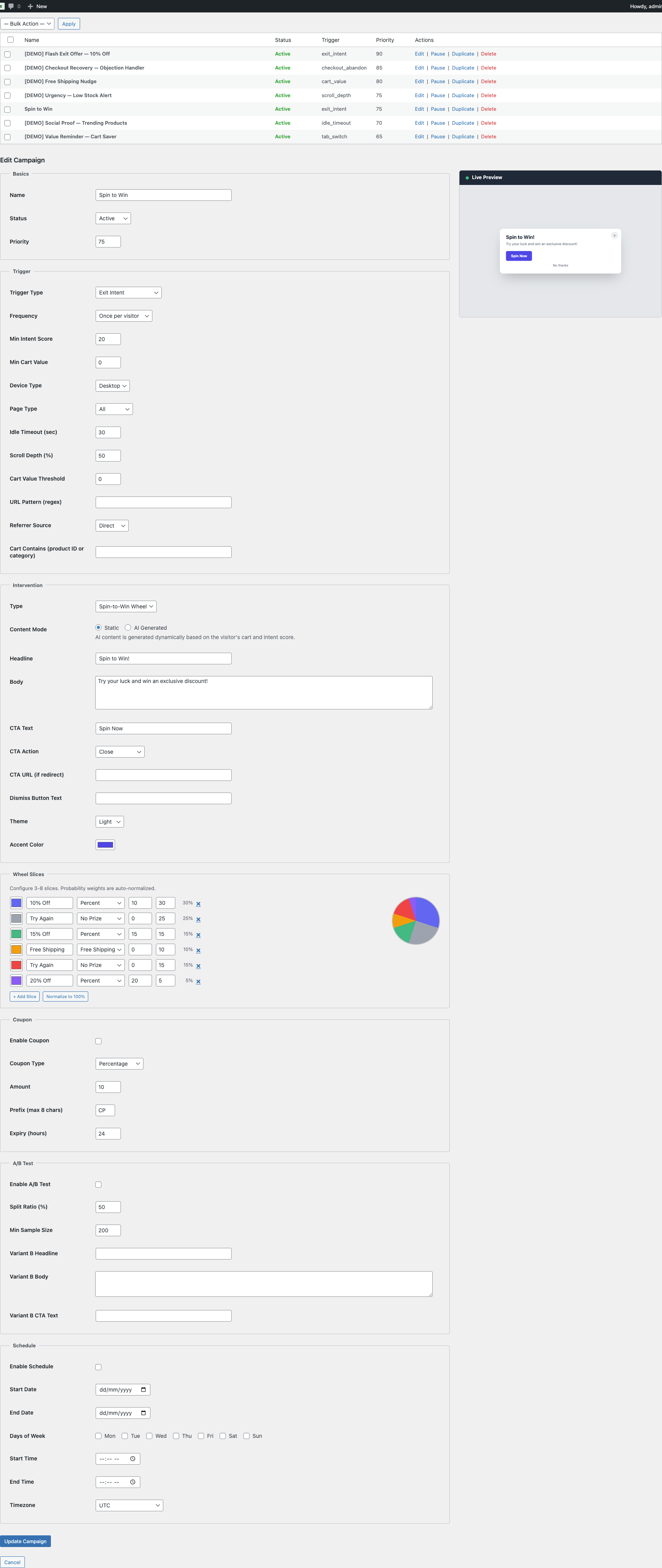 Spin-to-Win Campaign Configuration
How It Works
- Visitor clicks the CTA button (“Spin Now”).
- The server determines the winning slice based on probability weights.
- The wheel animates to land on the winning slice.
- If the winning slice has a discount, a WooCommerce coupon is generated and displayed to the visitor.
- The visitor can copy the code or click “Apply” to add it to their cart.
Preview
A mini conic-gradient preview updates in real time in the campaign editor as you add, remove, or modify slices.
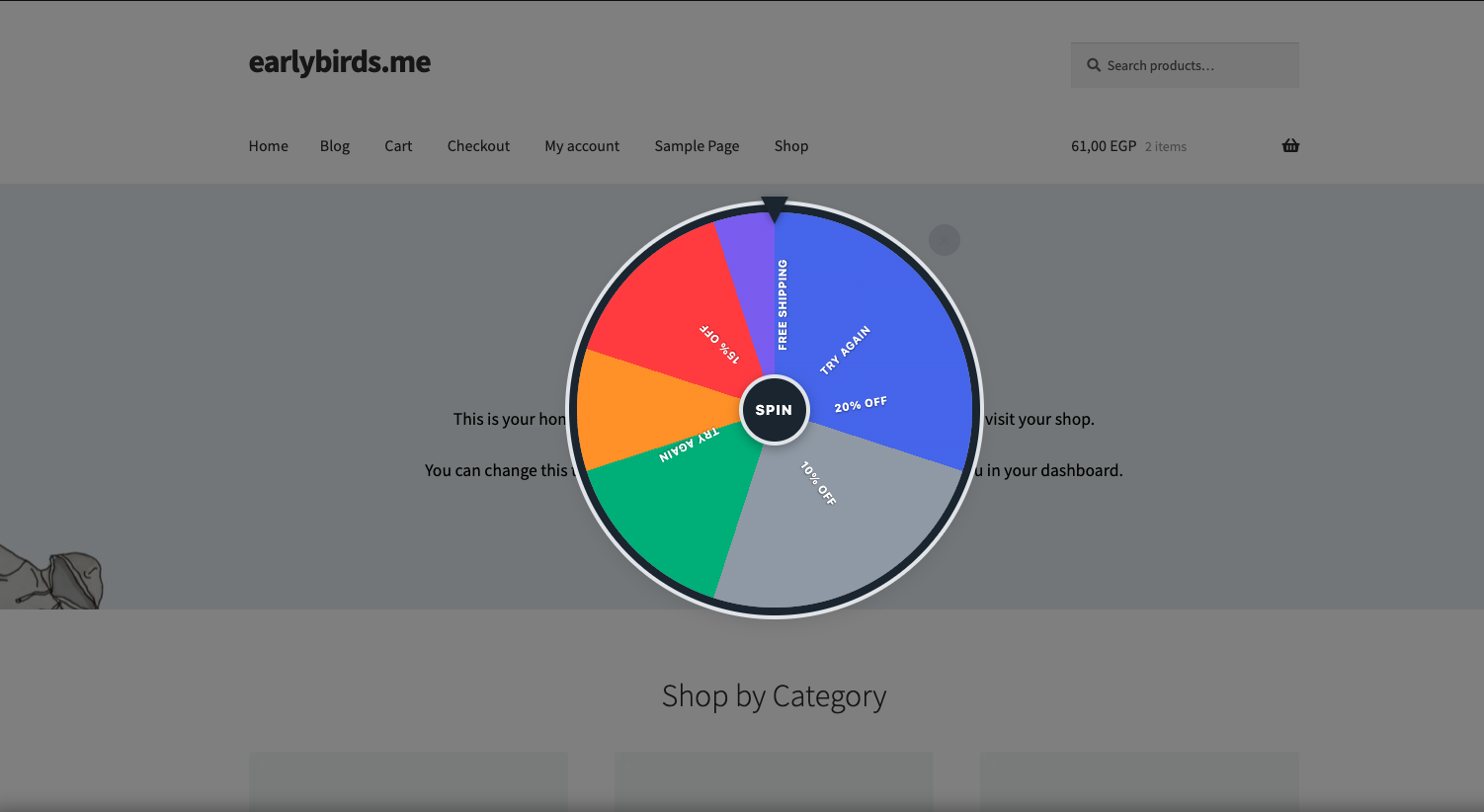 Spin Wheel Intervention on Storefront
Best Practices for Spin Wheel
- Always include at least one “Try Again” slice to create realistic odds and manage discount distribution.
- Keep slices between 4 and 6 for the best visual balance. Too few feels empty; too many is hard to read.
- Use contrasting colors for adjacent slices so boundaries are clear during the spin animation.
- Set probability weights strategically — weight smaller discounts higher to protect your margins while still giving the feeling of winning.
- Use descriptive labels — “10% Off Today!” is more engaging than “10%”.
- Pair with exit intent triggers — the spin wheel works best as a last-resort engagement before the visitor leaves.
15b. Email Capture Intervention
The email capture intervention is a specialized popup that collects visitor email addresses. This is the foundation of Cart Recovery Emails — once you have the visitor’s email, you can follow up with a recovery email if they abandon their cart.
How It Works
- A campaign with
email_capturetype fires based on your trigger rules (e.g., exit intent, idle timeout). - A popup appears with a headline, body text, an email input field, and a submit button.
- The visitor enters their email and clicks “Save My Cart” (or your custom CTA text).
- The email is linked to the visitor’s cart session on the server side.
- A success message confirms the email was saved.
- If the visitor later abandons their cart, the Cart Recovery system sends a follow-up email with a recovery link.
Configuration
| Field | Default | Description |
|---|---|---|
| Headline | “Save your cart” | Main heading text displayed above the form. |
| Body | “Enter your email and we’ll save your cart for later.” | Supporting body copy below the headline. |
| CTA Text | “Save My Cart” | Label on the submit button. |
| Privacy Text | “We’ll only use your email to send a cart reminder. No spam, ever.” | Shown below the form for GDPR transparency. |
Design
The email capture uses the same popup overlay styling as the standard popup template, with these additional elements:
- Email Input — Full-width email input with
type="email"and HTML5 validation. - Submit Button — Uses the campaign’s accent color.
- Feedback Area — Hidden by default. Shows “Cart saved!” on success or an error message on failure.
- Privacy Text — Small-font text below the form for consent transparency.
When to Use Email Capture
- Before offering a discount — Capture the email first, then follow up with a discount via cart recovery email.
- On high-value carts — Set a
min_cart_valuetargeting condition to prioritize valuable carts. - As a first touchpoint — Lower priority than discount campaigns. Let the email capture fire for visitors who don’t trigger higher-priority campaigns.
Email Validation
The storefront JavaScript performs client-side email validation using the HTML5 type="email" constraint. The server validates the email format again before storing it. Disposable email domains are not blocked by default but can be filtered via the earlybirds_cp_validate_email filter hook.
Privacy Considerations
- Email addresses are stored in the
{prefix}cp_cart_recoverytable alongside cart data. - Captured emails are included in WordPress Privacy Export requests.
- Captured emails are erased in WordPress Privacy Erasure requests.
- Emails are subject to the configured data retention period.
16. Analytics Dashboard
The analytics dashboard (CartPulse AI → Analytics) provides detailed performance metrics with interactive Chart.js-powered visualizations.
Charts
| Chart | Type | Description |
|---|---|---|
| Revenue Saved | Line chart (filled area) | Revenue saved over time. Hover for daily amounts. |
| Interventions vs Conversions | Bar chart | Side-by-side bars per day: interventions shown (indigo) vs converted (green). |
| Conversions by Strategy | Donut chart | Which intervention strategies drive the most conversions. |
| Checkout Funnel | Horizontal bar | Visit → Cart → Checkout → Payment → Order with percentage at each stage. |
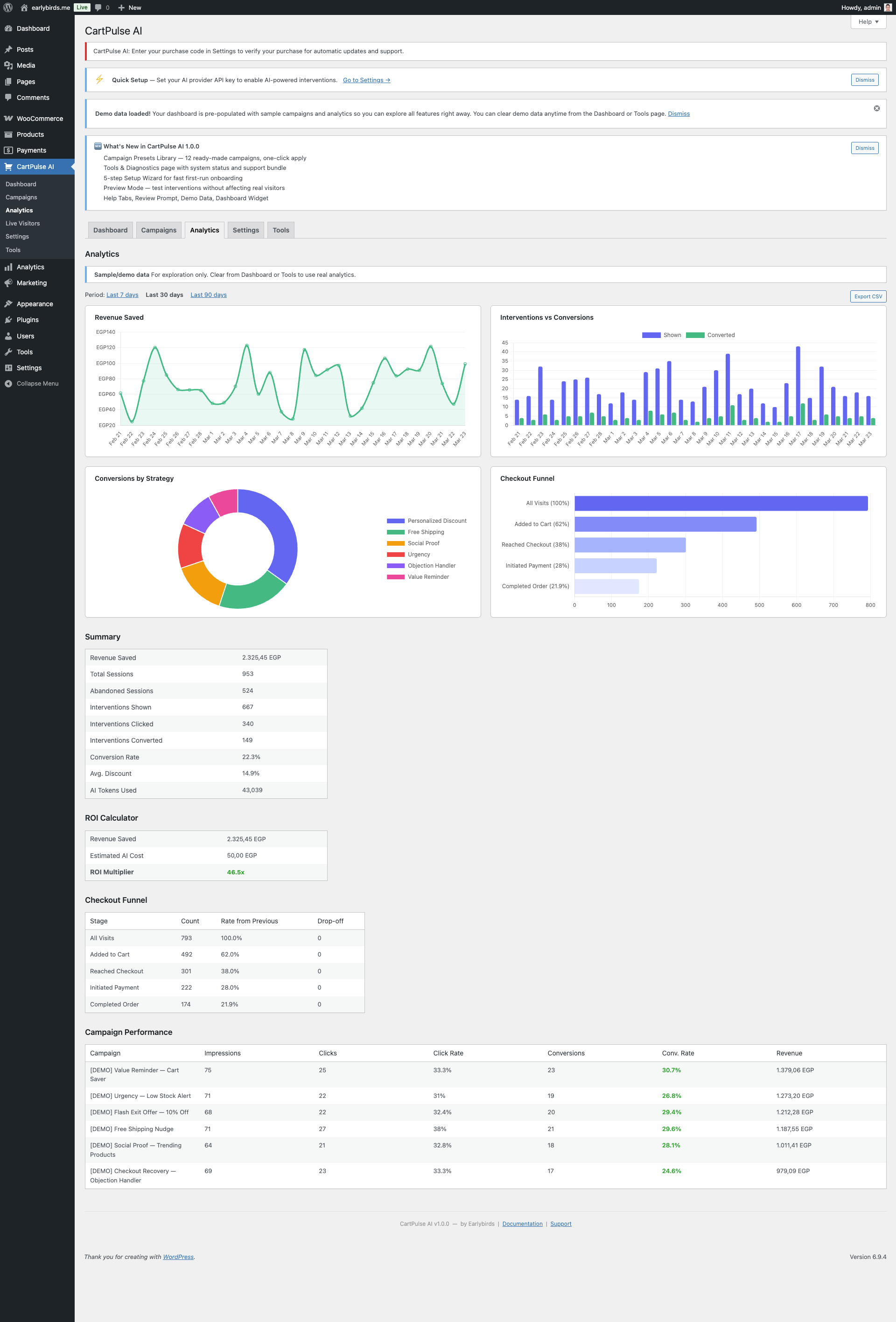 Analytics Dashboard with Charts
Summary Metrics
- Sessions — Unique visitor sessions tracked.
- Interventions Shown — How many sessions triggered a campaign.
- Conversions — Sessions that purchased after seeing an intervention.
- Attributed Revenue — Order revenue linked to intervention sessions.
- Conversion Rate — Conversions / Interventions Shown.
- ROI Calculator — Attributed revenue vs. estimated AI API cost.
Campaign Performance
Below the charts, a table breaks down performance per campaign with columns for impressions, clicks, conversions, conversion rate, and revenue attributed. A/B test variants appear as sub-rows.
Intent Distribution
A histogram showing the distribution of visitor intent scores (0–100) helps you understand your traffic’s engagement level.
Date Range & Export
- Date Range Picker — Filter by 7-day, 30-day, or 90-day periods.
- Export CSV — Download a spreadsheet with daily breakdowns and summary totals.
Email Digests
Enable Weekly Digest under Settings to receive a summary email every Monday with the previous week’s key metrics. Revenue milestone alerts can also be configured.
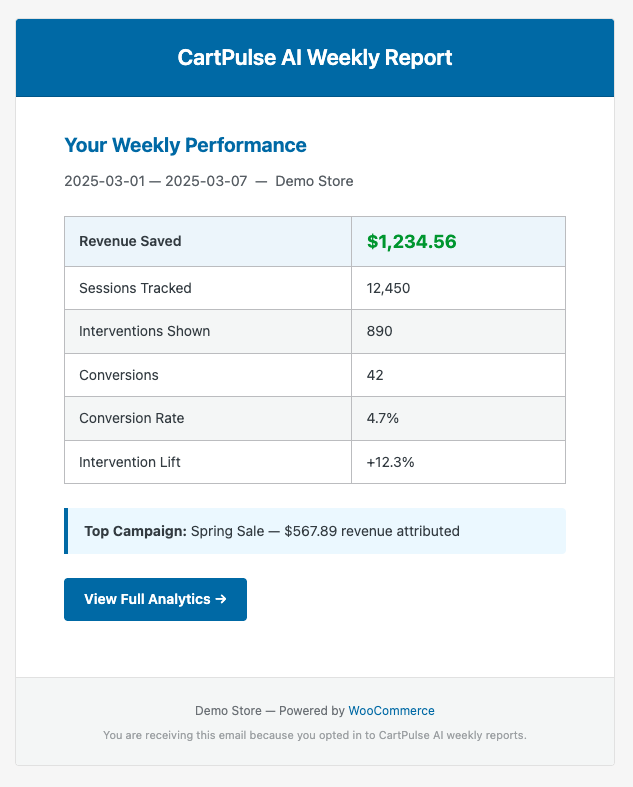 Weekly Performance Email Digest
Understanding Your Analytics
Key Metric Definitions
| Metric | Formula | Good Benchmark |
|---|---|---|
| Conversion Rate | Conversions ÷ Interventions Shown × 100 | 5–15% (varies by industry) |
| Revenue per Intervention | Attributed Revenue ÷ Interventions Shown | Depends on average order value |
| AI ROI | Attributed Revenue ÷ AI API Cost | 10x+ indicates strong value |
| Intervention Rate | Interventions Shown ÷ Total Sessions | 5–20% (too high = too aggressive) |
Reading the Checkout Funnel
The horizontal bar funnel shows drop-off at each stage:
- Visit → Cart — What percentage of visitors add items to their cart? Typical: 5–15%.
- Cart → Checkout — How many cart visitors proceed to checkout? Typical: 30–60%.
- Checkout → Payment — How many start entering payment details? The biggest drop-off is often here.
- Payment → Order — Payment completion rate. Should be 85%+ (if lower, investigate payment gateway issues).
CartPulse AI interventions are most effective at the Cart → Checkout and Checkout → Payment stages, where exit intent and idle timeout triggers detect hesitation.
Strategy Effectiveness
The donut chart shows which intervention strategies drive conversions. Use this to identify your best-performing approach:
- If discounts dominate, your visitors are price-sensitive. Test smaller discounts to protect margins.
- If social proof converts well, your visitors need trust signals. Expand social proof campaigns.
- If urgency performs best, your visitors respond to scarcity. Test countdown timers and limited-time offers.
- If free shipping converts, your shipping threshold may be set optimally. Consider whether lowering it would increase overall revenue.
17. Live Visitors Dashboard
The live visitors page (CartPulse AI → Live Visitors) shows a real-time view of active visitors on your store.
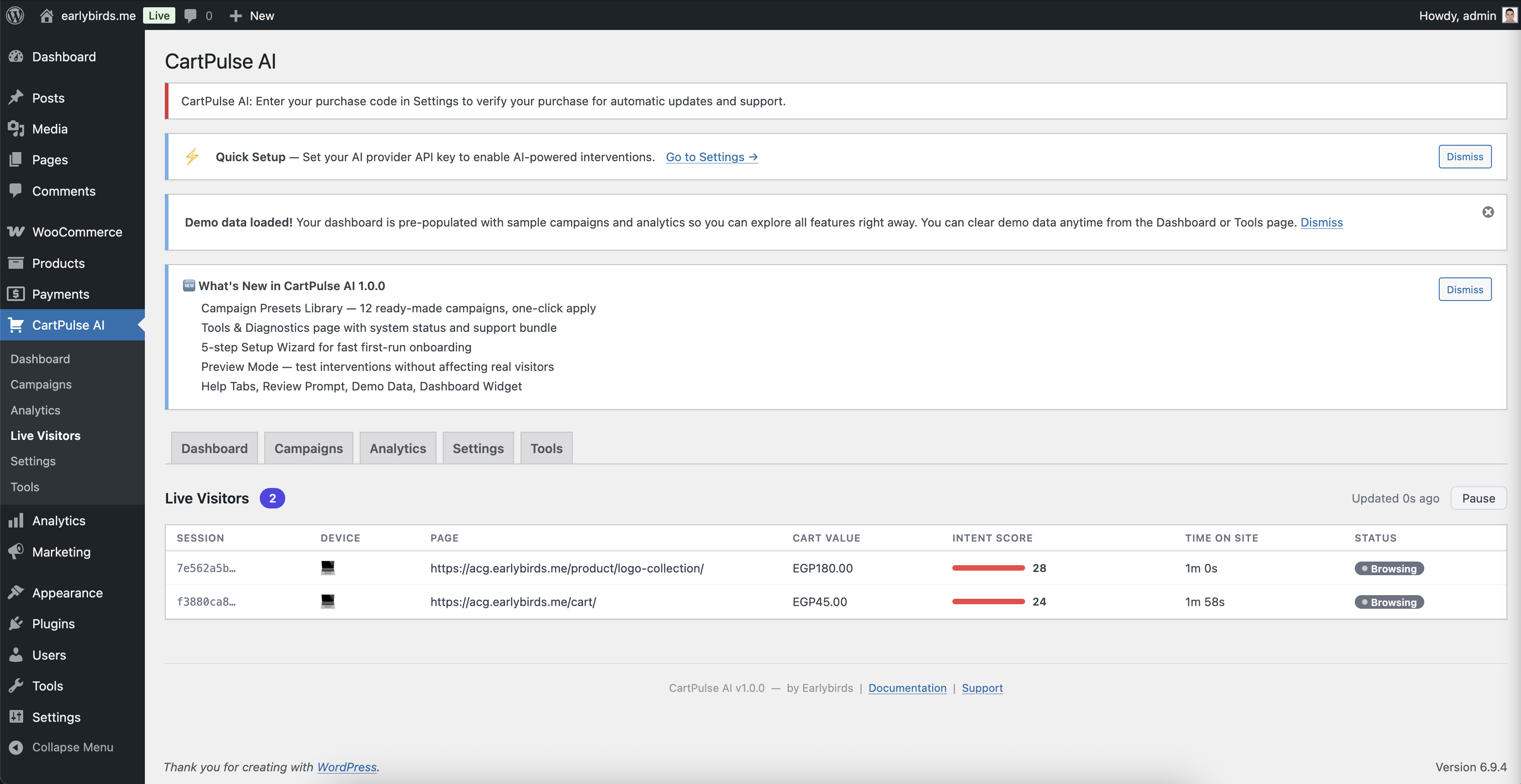 Live Visitors Dashboard
Per-Visitor Data
| Column | Description |
|---|---|
| Session ID | Anonymous session identifier (truncated for display). |
| Page | Current page the visitor is viewing. |
| Page Type | Product, cart, checkout, category, shop, or other. |
| Intent Score | Real-time purchase intent score (0–100) with a progress bar. |
| Cart Value | Current cart total in store currency. |
| Device | Desktop or Mobile. |
| Duration | Time since session started. |
| Status | Hot (intent ≥ 60), Warm (intent 30–59), or Browsing (intent < 30). |
Auto-Refresh
The dashboard auto-refreshes every 15 seconds via the REST API. No manual refresh is needed.
18. Cart Recovery Emails
CartPulse AI can send automated recovery emails to visitors who abandon their carts. This feature works alongside real-time interventions to recover sales even after the visitor has left.
Settings
| Setting | Description |
|---|---|
| Enabled | Toggle cart recovery emails on/off. |
| Delay (minutes) | How long to wait after cart abandonment before sending the email (default: 60). |
| Coupon Enabled | Include an auto-generated discount coupon in the recovery email. |
| Coupon Type | Percent or fixed discount. |
| Coupon Amount | Discount value for the recovery coupon. |
| Email Subject | Custom subject line for the recovery email. |
How It Works
- When a session with items in the cart expires without a purchase, a recovery record is created.
- An hourly cron job checks for pending recovery records that have passed the delay threshold.
- The recovery email is sent with a unique recovery link (
?cp_recover=TOKEN). - Clicking the link restores the visitor’s cart and redirects them to the cart page.
- Old recovery records (7+ days) are automatically expired and cleaned up.
Recovery Email Content
The recovery email includes:
- Subject line — Customizable per Settings. Default: “You left something in your cart”.
- Cart summary — Product names, quantities, and images from the abandoned cart.
- Recovery link — A unique URL (
?cp_recover=TOKEN) that restores the cart and redirects to the cart page. - Discount coupon — Optional auto-generated coupon displayed prominently with a copy button.
- Store branding — Uses your store name and logo from WooCommerce settings.
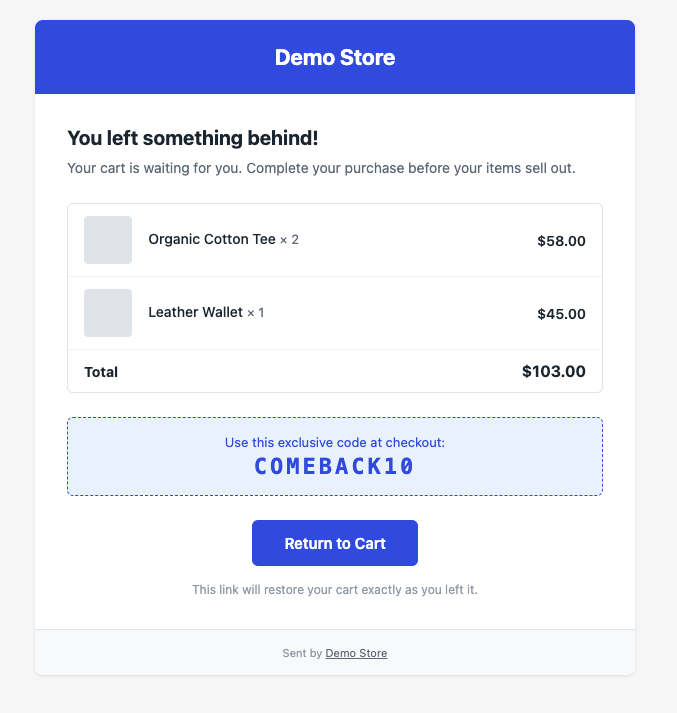 Cart Recovery Email
Recovery Workflow Timeline
| Time | Event |
|---|---|
| T+0 | Visitor adds items to cart. |
| T+0 to T+30m | Visitor browses. Email may be captured via email capture intervention or checkout form. |
| T+30m | Session expires (configurable). Recovery record is created if email is available. |
| T+30m to T+60m | Delay period (configurable). No email sent yet — the visitor may return on their own. |
| T+60m | Hourly cron job checks for pending recovery records past the delay. Recovery email is sent. |
| T+60m to T+7d | Recovery link is active. Visitor can click to restore their cart. |
| T+7d | Recovery record expires. Link is no longer valid. |
Optimizing Cart Recovery
- Delay timing matters — 30–60 minutes is optimal for most stores. Too short feels aggressive; too long and the visitor has moved on.
- Combine with email capture — Cart recovery only works if you have the visitor’s email. Use the Email Capture intervention early in the session to maximize coverage.
- Include a coupon — Recovery emails with a discount coupon convert at 2–3x the rate of emails without one.
- Use SMTP — The default WordPress
wp_mail()function often lands in spam. Use an SMTP plugin (WP Mail SMTP, FluentSMTP) for reliable delivery. - Monitor delivery — Check the cart recovery list in CartPulse AI → Cart Recovery for “sent” vs. “pending” counts. If emails remain pending, check your cron and mail configuration.
19. Complete Settings Reference
All settings are under CartPulse AI → Settings.
General
| Setting | Default | Description |
|---|---|---|
| Enabled | Yes | Master switch for all tracking and interventions. |
| Debug Mode | No | Enables verbose logging to WooCommerce → Status → Logs. Disable in production. |
AI Configuration
| Setting | Default | Description |
|---|---|---|
| AI Provider | (none) | OpenAI or Anthropic. Leave blank to use static templates only. |
| OpenAI API Key | — | Encrypted at rest using libsodium. Never displayed after saving. |
| Anthropic API Key | — | Encrypted at rest using libsodium. Never displayed after saving. |
| Model | (auto) | Model for AI content generation (e.g., gpt-4o, claude-3-haiku). |
| Monthly Budget (USD) | $50.00 | Hard cap on AI API spending. Range: $0–$10,000. |
| Default Tone | Friendly | Friendly, Professional, Urgent, or Casual. Overridable per campaign. |
| Default Language | English | Language for AI-generated text. Overridable per campaign. |
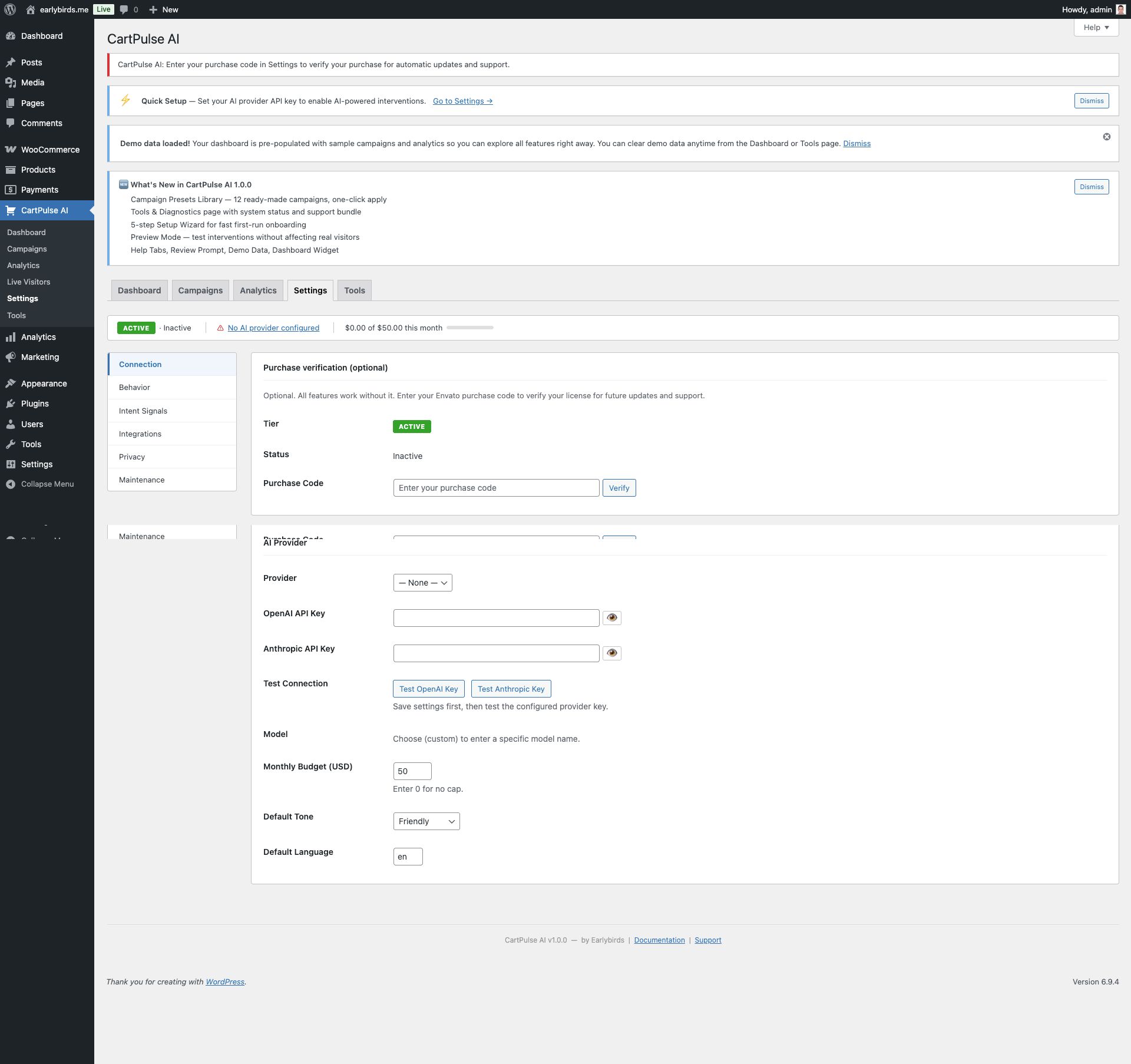 Settings: AI Provider Connection
Obtaining an API Key
| Provider | Where to Get a Key |
|---|---|
| OpenAI | platform.openai.com → API Keys → Create new secret key |
| Anthropic | console.anthropic.com → API Keys → Create Key |
Behavior Tracking
| Setting | Default | Description |
|---|---|---|
| Session Timeout (minutes) | 30 | Minutes of inactivity before a session expires. Range: 1–1440. |
| Batch Interval (ms) | 5000 | How often the storefront sends behavior events to the server. Range: 1000–60000. |
| Max Interventions per Session | 2 | Maximum number of interventions shown in one session. Range: 1–10. |
| Intervention Cooldown (seconds) | 60 | Minimum time between showing two interventions. Range: 0–3600. |
| Intent Weights | (defaults) | Custom weights for the 12 intent scoring signals. Auto-normalizes to 100. |
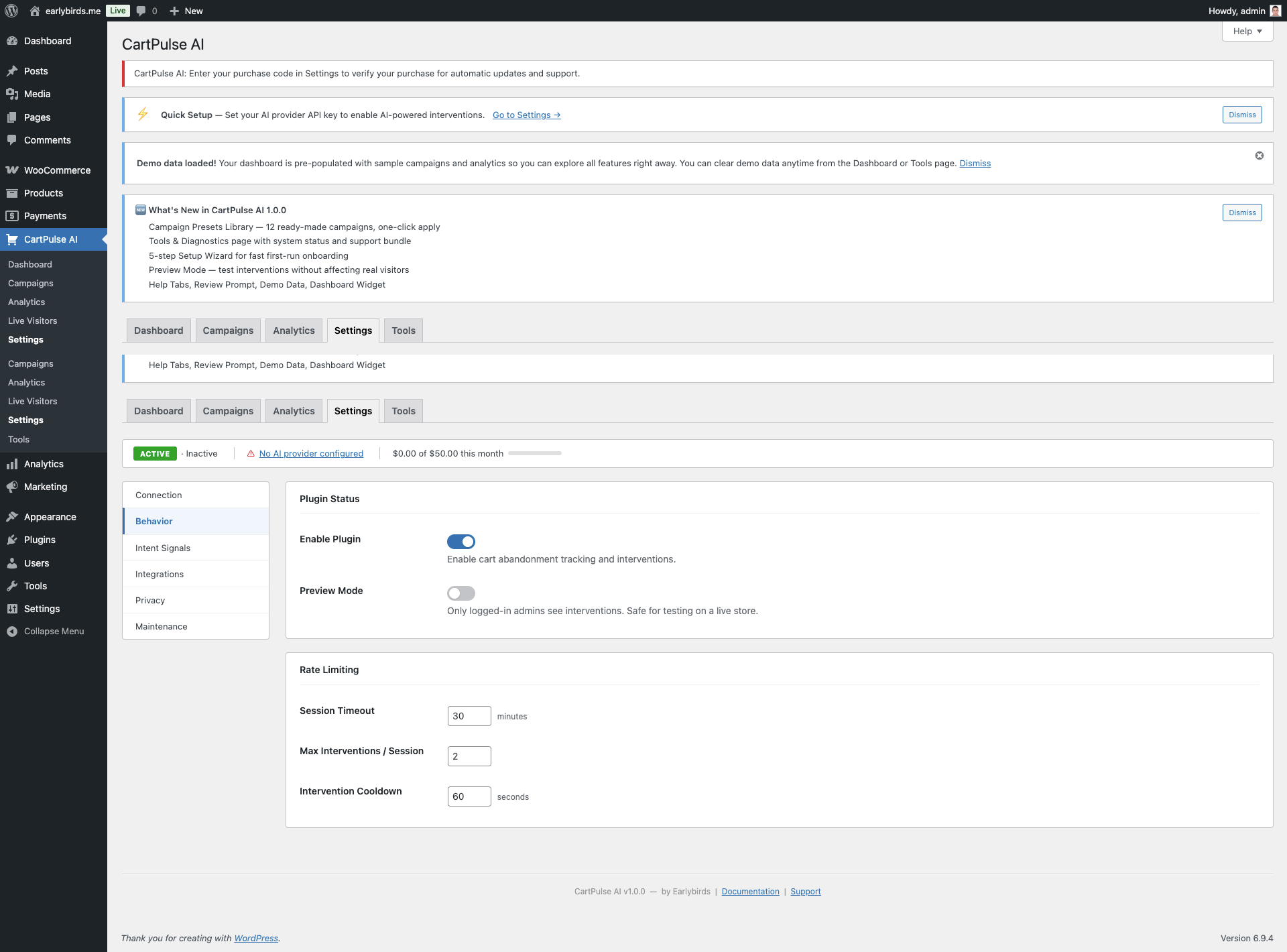 Settings: Behavior Tracking
Privacy
| Setting | Default | Description |
|---|---|---|
| Cookie Consent | Auto-detect | Auto-detect: checks for CookieYes, Complianz, Cookie Notice (dFactory), Borlabs Cookie, CookieBot, WP Consent API. WP Consent API: uses only the WP Consent API standard. None: always track (not recommended in EU). |
| Consent Category | Statistics | Which consent category must be accepted: Statistics or Marketing. |
| Respect Do Not Track | Yes | Honor the browser DNT header. |
| Data Retention (days) | 30 | Days to keep behavior events and session data. Range: 1–365. A daily cron purges older records. |
| Delete Data on Uninstall | No | When enabled, all plugin tables and options are removed on plugin deletion. |
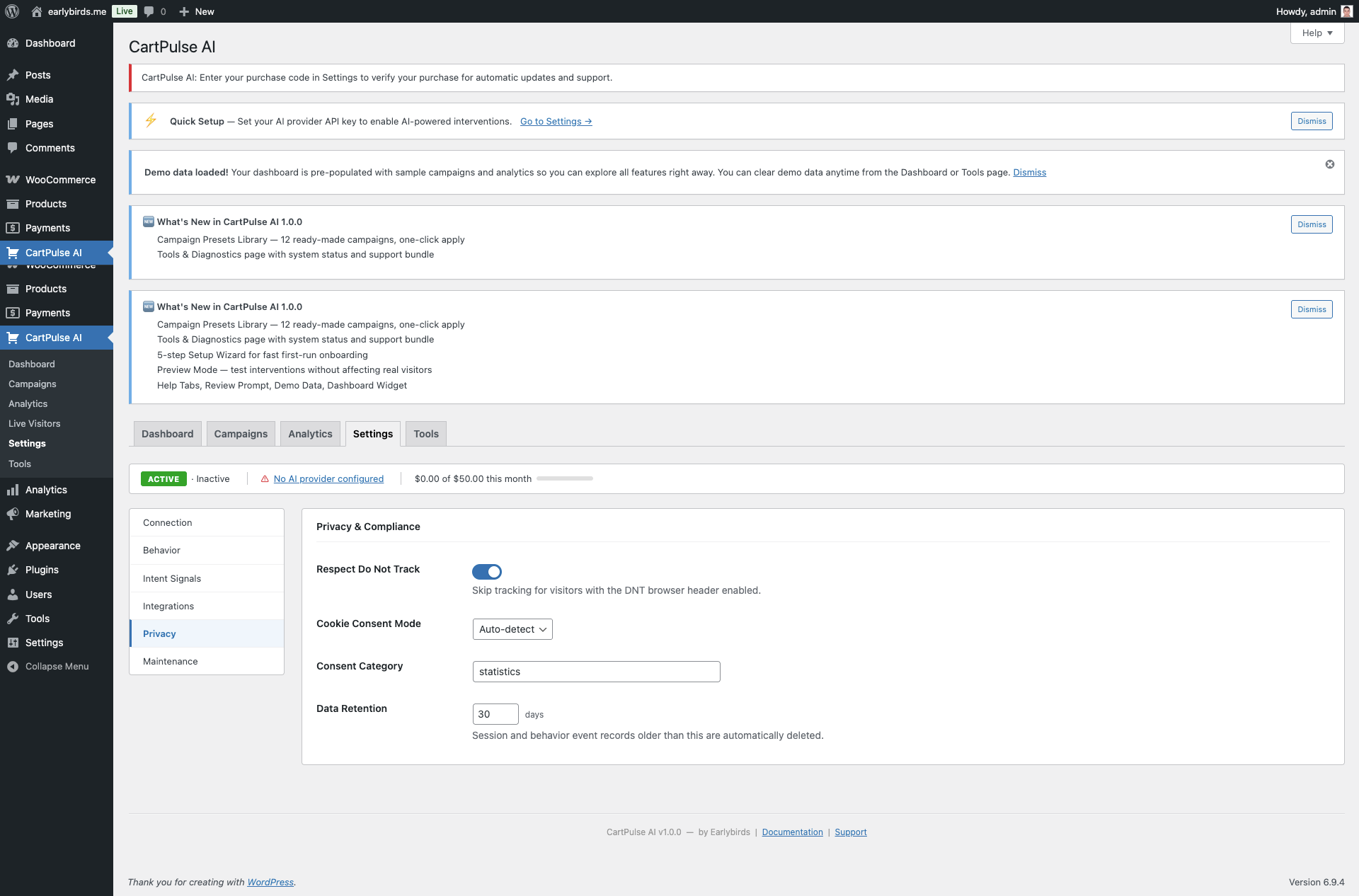 Settings: Privacy & Consent
Store Context
| Setting | Default | Description |
|---|---|---|
| Free Shipping Threshold | 0 | Cart value required for free shipping. Used by the {shipping_gap} and {shipping_threshold} merge tags. |
| Return Policy | (blank) | Summary of your return policy. Provided to AI for objection handling prompts. |
| Shipping Policy | (blank) | Summary of your shipping policy. Provided to AI prompts. |
| Guarantees | (blank) | Satisfaction guarantees. Provided to AI prompts. |
Notifications
| Setting | Default | Description |
|---|---|---|
| Weekly Digest | Off | Send a weekly performance summary email every Monday. |
| Digest Recipients | Admin email | Comma-separated email addresses for the digest. |
| Revenue Milestone Alerts | On | Notify when revenue saved reaches significant milestones. |
Integrations
| Setting | Default | Description |
|---|---|---|
| GA4 Measurement ID | (blank) | Google Analytics 4 measurement ID (G-XXXXXXXXXX) for event tracking. |
| Webhook URL | (blank) | Endpoint URL for webhook delivery. |
| Webhook Secret | (blank) | Shared secret for HMAC-SHA256 signature verification. |
| Webhook Events | intervention.shown, intervention.converted, order.attributed | Events that trigger webhook delivery. |
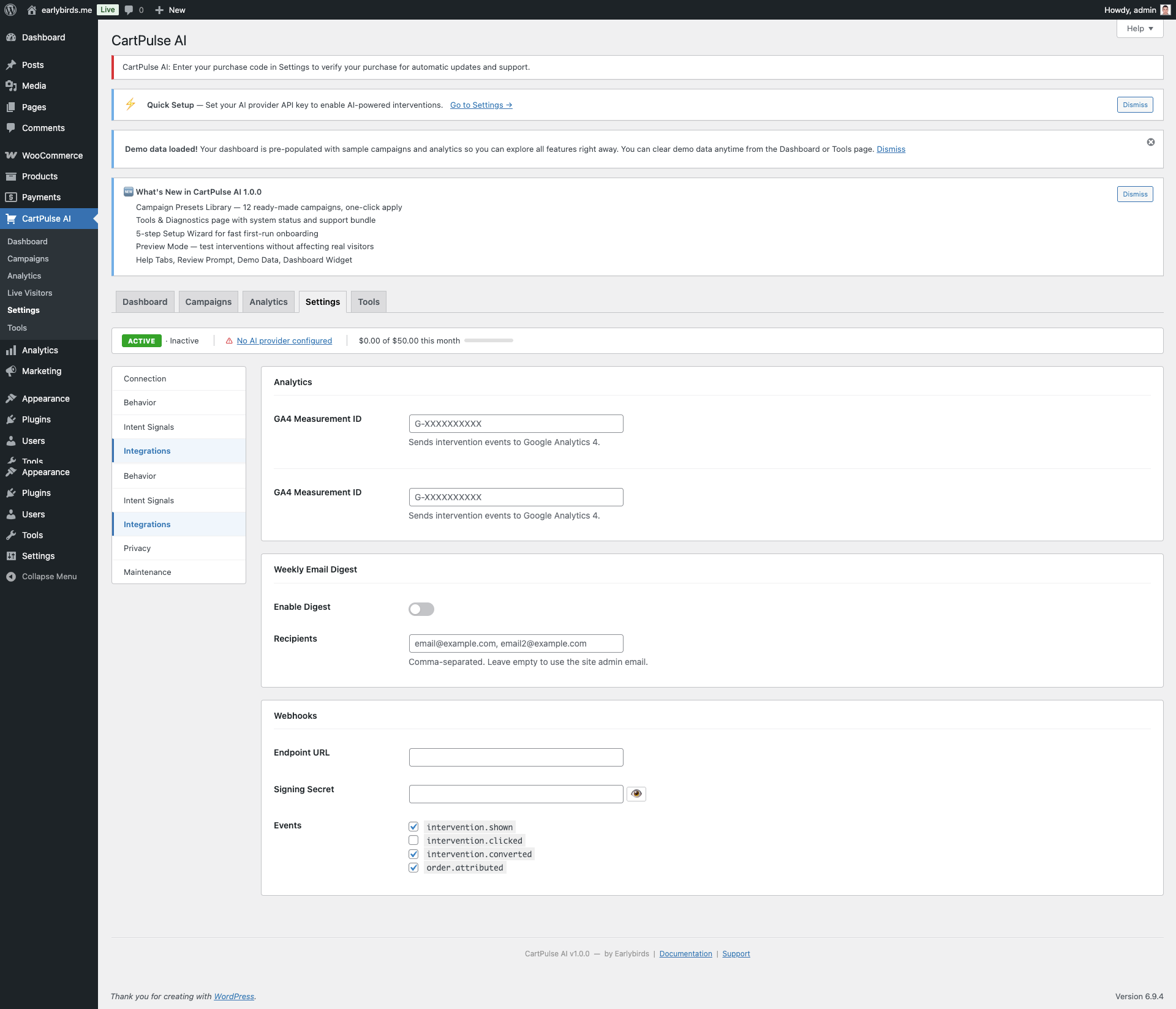 Settings: Integrations (GA4, Webhooks)
Excluded Roles & Pages
| Setting | Default | Description |
|---|---|---|
| Excluded Roles | Administrator, Shop Manager | When the storefront is live, these roles do not see interventions. Until the Setup Wizard is finished, only admins load the storefront. Use Preview mode or incognito to test as a shopper. |
| Excluded Pages | (none) | Specific page IDs or slugs to skip. |
| Trusted Proxy IPs | (none) | If behind a load balancer, list proxy IPs so rate limiting uses the real client IP. |
License
| Setting | Description |
|---|---|
| Purchase Code | Your CodeCanyon/Envato purchase code (UUID). Used to verify your purchase for updates and support. |
| Verification Status | Verified, Unverified, or Invalid. Checked periodically against the Envato API. |
Cart Recovery
| Setting | Default | Description |
|---|---|---|
| Enable Cart Recovery | Off | Toggle automated cart recovery emails. |
| Delay (minutes) | 60 | Wait time before sending recovery email. |
| Recovery Coupon | Off | Include an auto-generated coupon in the email. |
| Coupon Type | Percent | Percentage or fixed amount discount. |
| Coupon Amount | 10 | Discount value. |
| Email Subject | (default) | Custom subject line for recovery emails. |
20. Tools & Diagnostics
The Tools page (CartPulse AI → Tools) provides system diagnostics, maintenance actions, a log viewer, and a support bundle generator.
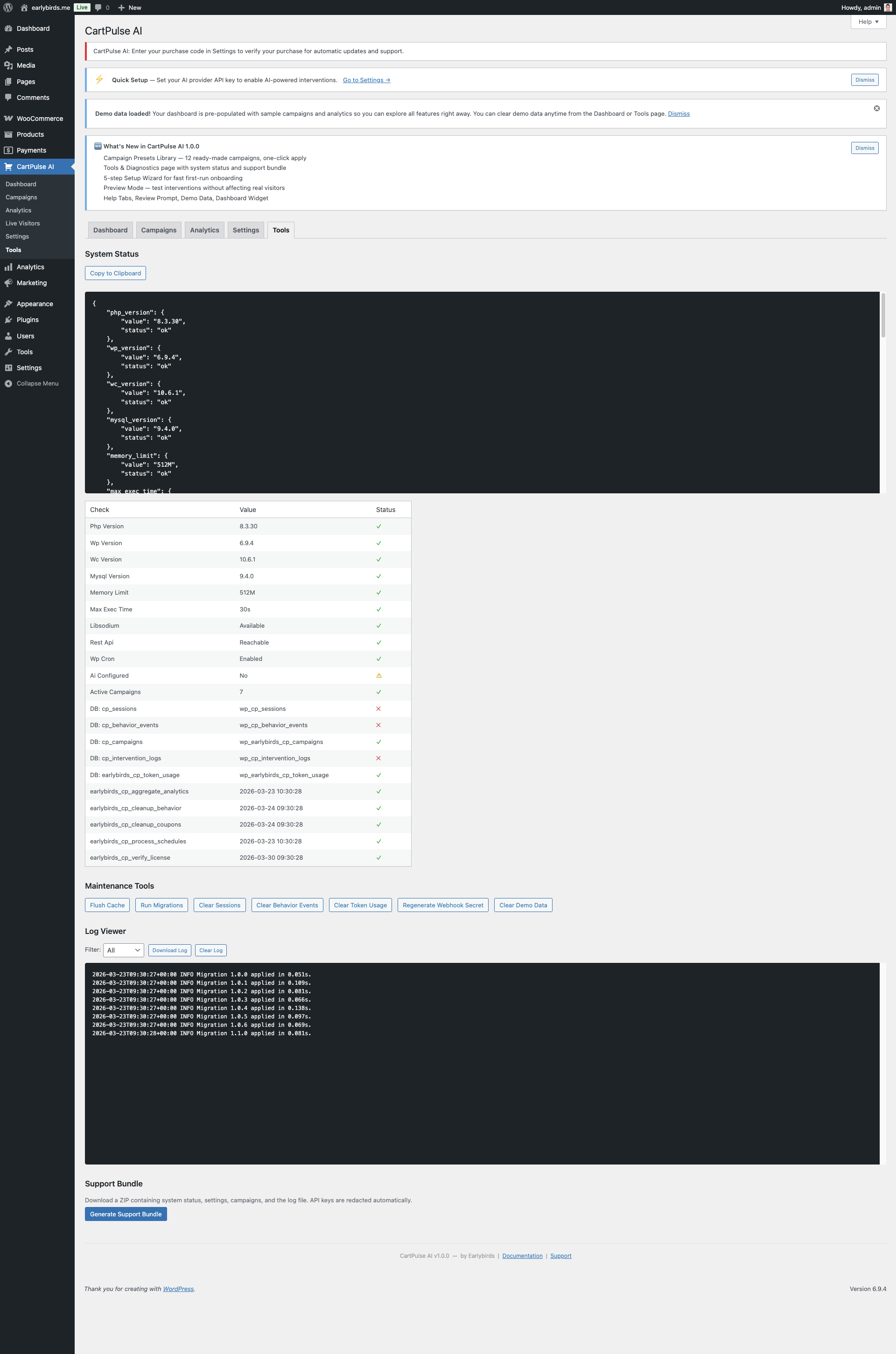 Tools & Diagnostics Page
System Status Checks
A comprehensive status table displays 15+ environment checks:
| Check | What It Verifies |
|---|---|
| PHP Version | PHP ≥ 7.4 |
| WordPress Version | WP version reported |
| WooCommerce Version | WC is active and version |
| MySQL Version | Database server version |
| Memory Limit | ≥ 128 MB recommended |
| Max Execution Time | PHP max_execution_time |
| libsodium | sodium extension available for encryption |
| REST API | WordPress REST API is reachable |
| WP-Cron | Not disabled by DISABLE_WP_CRON |
| AI Configured | At least one API key is set |
| Active Campaigns | Number of active campaigns |
| DB Tables (5+) | Each plugin table exists |
| Cron Events (5) | Each cron hook is scheduled with next run time |
Click Copy to Clipboard to copy the full status as JSON for support requests.
Maintenance Tools
| Tool | Description | Confirmation Required |
|---|---|---|
| Flush Cache | Clear all plugin cache entries. | No |
| Run Migrations | Re-run database migrations (safe to run multiple times). | No |
| Clear Sessions | Truncate the sessions table. | Yes |
| Clear Behavior Events | Truncate the behavior events table. | Yes |
| Clear Token Usage | Reset AI token usage tracking. | Yes |
| Regenerate Webhook Secret | Generate a new random webhook signing secret. | Yes |
| Clear Demo Data | Remove all imported demo campaigns and analytics. | Yes |
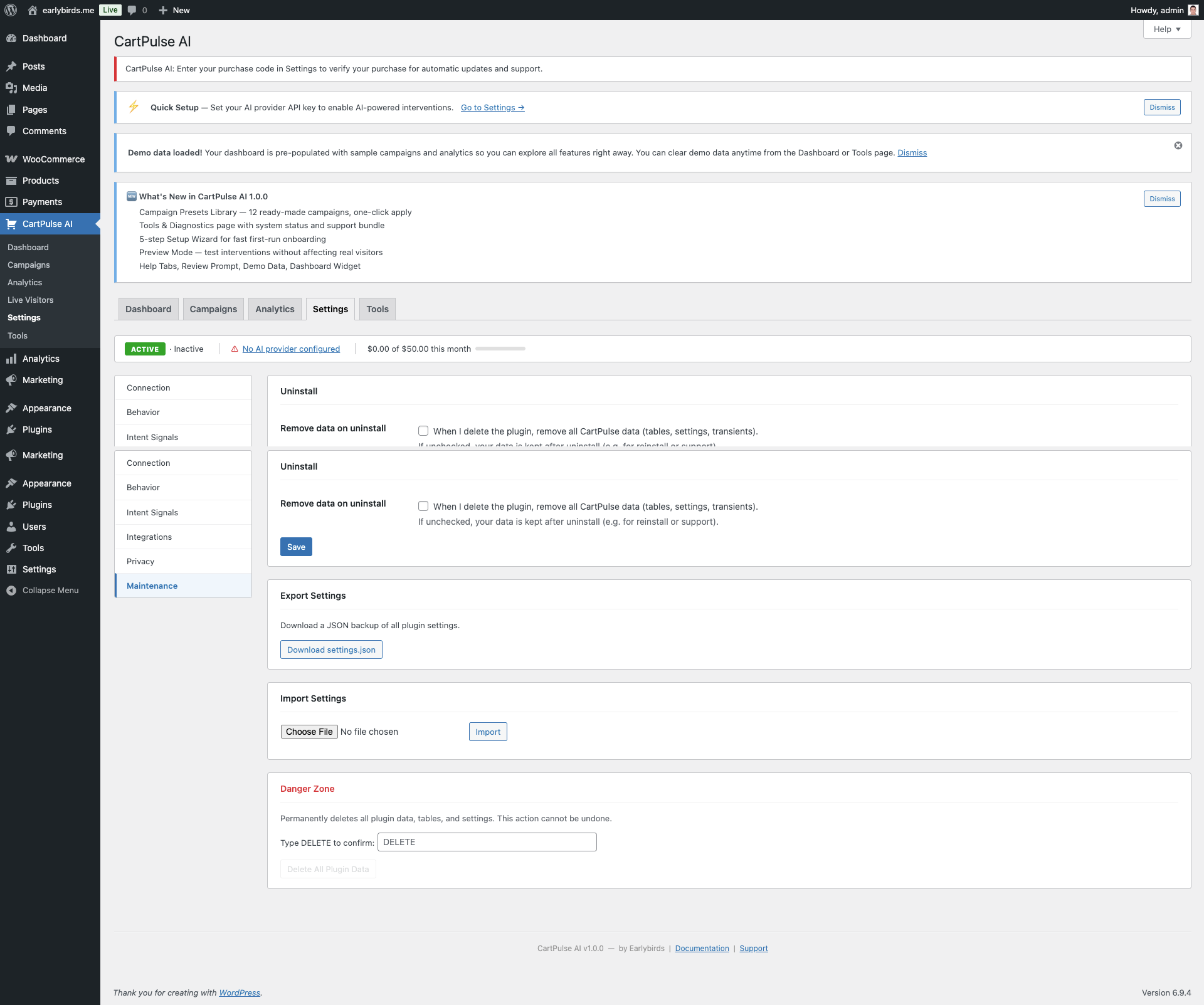 Maintenance Tools
Log Viewer
View the last 200 lines of the plugin log file (stored in WooCommerce’s log directory). Filter by level: All, Error, Warning, Info, or Debug. Download the full log or clear it.
Support Bundle
Click Generate Support Bundle to download a ZIP containing:
system-status.json— Full system status checks.settings.json— Plugin settings (API keys are redacted).campaigns.json— All campaign configurations.cp-log.txt— Last 500 log lines.
21. REST API Reference
CartPulse AI exposes a comprehensive REST API under the namespace earlybirds-cp/v1. All admin endpoints require authentication via cookie+nonce or application password with manage_woocommerce capability.
https://yoursite.com/wp-json/earlybirds-cp/v1/Campaigns
| Method | Endpoint | Description |
|---|---|---|
| GET | /campaigns | List all campaigns (supports status filter, pagination). |
| POST | /campaigns | Create a new campaign. |
| GET | /campaigns/{id} | Get a single campaign by ID. |
| PUT | /campaigns/{id} | Update a campaign. |
| DELETE | /campaigns/{id} | Delete a campaign. |
| POST | /campaigns/import | Import campaigns from JSON. |
| GET | /campaigns/export | Export all campaigns as JSON. |
Analytics
| Method | Endpoint | Description |
|---|---|---|
| GET | /analytics/summary | Summary metrics for a date range. |
| GET | /analytics/daily | Daily breakdown of metrics. |
| GET | /analytics/campaigns | Per-campaign performance breakdown. |
| GET | /analytics/funnel | Checkout funnel data. |
| GET | /analytics/strategies | Conversions by intervention strategy. |
| GET | /analytics/intent-distribution | Intent score histogram. |
| GET | /analytics/export | CSV download of analytics data. |
Behavior (Public)
| Method | Endpoint | Auth | Description |
|---|---|---|---|
| POST | /behavior/session | Nonce | Create or resume a visitor session. |
| POST | /behavior/events | Nonce | Batch-submit behavior events. |
| POST | /behavior/heartbeat | Nonce | Keep session alive. |
Interventions
| Method | Endpoint | Description |
|---|---|---|
| POST | /interventions/evaluate | Evaluate campaigns and return matching intervention. |
| POST | /interventions/shown | Log an intervention impression. |
| POST | /interventions/dismissed | Log an intervention dismissal. |
| POST | /interventions/clicked | Log a CTA click. |
| POST | /interventions/spin | Execute a spin-to-win wheel spin. |
Settings (Admin)
| Method | Endpoint | Description |
|---|---|---|
| GET | /settings | Get all settings (API keys masked). |
| PUT | /settings | Update settings (partial update supported). |
| POST | /settings/test-connection | Test AI provider connection. |
| GET | /system/status | Structured system health checks. |
Live Visitors (Admin)
| Method | Endpoint | Description |
|---|---|---|
| GET | /live-visitors | Active sessions with intent scores, cart values, and page info. |
Cart Recovery (Admin)
| Method | Endpoint | Description |
|---|---|---|
| GET | /cart-recovery | List pending and sent recovery records. |
| DELETE | /cart-recovery/{id} | Delete a recovery record. |
Rate Limiting
All endpoints are rate-limited: 60 requests/minute for general endpoints, 10 requests/minute for AI-related endpoints. Rate limit headers (X-RateLimit-Limit, X-RateLimit-Remaining) are included in responses.
Authentication
Admin endpoints require one of these authentication methods:
| Method | How to Use | Best For |
|---|---|---|
| Cookie + Nonce | Automatic when using the WordPress admin. The nonce is passed via X-WP-Nonce header. | Admin AJAX, custom admin pages |
| Application Password | Set Authorization: Basic base64(username:app_password) header. | External integrations, scripts, CI/CD |
Public endpoints (behavior session, events, heartbeat, intervention evaluate) use a lightweight nonce-based authentication that the storefront script handles automatically.
API Request & Response Examples
Create a Campaign
POST /wp-json/earlybirds-cp/v1/campaigns
Content-Type: application/json

{
  "name": "Summer Sale Exit Intent",
  "status": "draft",
  "priority": 70,
  "trigger_config": {
    "trigger_type": "exit_intent",
    "frequency": "once_per_session",
    "min_cart_value": 25,
    "device_type": "all",
    "page_type": "all"
  },
  "intervention": {
    "type": "popup",
    "template_id": "popup-default",
    "content_mode": "static",
    "content": {
      "headline": "Wait! Summer Sale ends tonight",
      "body": "Use code SUMMER10 for 10% off your {cart_total} cart.",
      "cta_text": "Apply Discount",
      "cta_action": "apply_coupon"
    },
    "design": {
      "theme": "light",
      "accent_color": "#059669",
      "animation": "fade-up"
    }
  }
}
Response
{
  "id": 15,
  "name": "Summer Sale Exit Intent",
  "status": "draft",
  "priority": 70,
  "created_at": "2026-03-15T10:30:00Z",
  "updated_at": "2026-03-15T10:30:00Z"
}
Get Analytics Summary
GET /wp-json/earlybirds-cp/v1/analytics/summary?days=30Response
{
  "sessions": 4521,
  "interventions_shown": 892,
  "conversions": 78,
  "conversion_rate": 8.74,
  "attributed_revenue": 6240.50,
  "ai_cost": 12.30,
  "roi": 507.36,
  "period": {
    "start": "2026-02-15",
    "end": "2026-03-17"
  }
}
Error Responses
All error responses follow the WordPress REST API standard format:
{
  "code": "cp_validation_error",
  "message": "Campaign name is required.",
  "data": {
    "status": 400,
    "reference_id": "cp_err_abc123"
  }
}| HTTP Code | Meaning |
|---|---|
| 400 | Validation error — check the message field for details. |
| 401 | Authentication required or invalid credentials. |
| 403 | Insufficient permissions (manage_woocommerce required for admin endpoints). |
| 404 | Resource not found (campaign, recovery record, etc.). |
| 429 | Rate limited. Wait and retry. Check X-RateLimit-Remaining header. |
22. Webhooks
Webhooks push real-time events to external systems such as Zapier, Make, or custom endpoints.
Supported Events
| Event | When Fired |
|---|---|
intervention.shown | An intervention was displayed to a visitor. |
intervention.converted | A visitor who saw an intervention completed a purchase. |
order.attributed | An order was attributed to a CartPulse AI session. |
campaign.updated | A campaign was created, updated, or status changed. |
Payload Format
{
  "event": "intervention.shown",
  "timestamp": "2026-02-18T14:30:00Z",
  "plugin_version": "1.0.0",
  "data": {
    "session_id": "abc123",
    "campaign_id": 42,
    "variant_id": 1,
    "cart_value": "59.99"
  }
}
HMAC-SHA256 Signature Verification
When a Webhook Secret is configured, every request includes an X-CartPulse-Signature header containing an HMAC-SHA256 hash of the raw request body.
PHP Verification Example
$body      = file_get_contents('php://input');
$signature = $_SERVER['HTTP_X_CARTPULSE_SIGNATURE'] ?? '';
$expected  = hash_hmac('sha256', $body, YOUR_SECRET_KEY);

if ( ! hash_equals($expected, $signature) ) {
    http_response_code(401);
    exit('Invalid signature');
}
Security
- Webhook URLs are validated to prevent SSRF — only public HTTP/HTTPS URLs are allowed.
- Private/reserved IP ranges (127.x, 10.x, 192.168.x, etc.) are blocked.
- Delivery timeout is 10 seconds.
23. WP-CLI Commands
CartPulse AI registers WP-CLI commands under the wp earlybirds namespace.
# Run database migrations (safe to run multiple times)
wp earlybirds migrate

# Flush all plugin cache entries
wp earlybirds cache:flush

# Show plugin status (version, DB version, license, AI provider)
wp earlybirds status

# Export all settings to a JSON file
wp earlybirds settings:export --file=/path/to/settings.json

# Import settings from a JSON file
wp earlybirds settings:import --file=/path/to/settings.json| Command | Description |
|---|---|
wp earlybirds migrate | Create or upgrade plugin database tables to the current schema version. Safe to re-run. |
wp earlybirds cache:flush | Delete all cached objects created by this plugin (does not affect other WP object cache entries). |
wp earlybirds status | Display plugin version, database schema version, license status, AI provider, and rate-limiter stats. |
wp earlybirds settings:export | Write current settings to a JSON file. API keys are excluded for security. |
wp earlybirds settings:import | Restore settings from a previously exported JSON file. Does not overwrite API keys. |
Example Output
wp earlybirds status
$ wp earlybirds status

CartPulse AI Status
===================
Plugin Version:   1.0.0
DB Schema:        3
AI Provider:      OpenAI (gpt-4o)
AI Budget:        $12.30 / $50.00 (24.6%)
Active Campaigns: 4
Total Sessions:   12,847
License:          Verified

Cron Events:
  earlybirds_cp_aggregate_analytics  Next: 2026-03-17 14:00:00 UTC
  earlybirds_cp_cleanup_behavior     Next: 2026-03-17 14:00:00 UTC
  earlybirds_cp_cleanup_coupons      Next: 2026-03-17 14:00:00 UTC
  earlybirds_cp_process_schedules    Next: 2026-03-17 14:00:00 UTC
  earlybirds_cp_send_recovery_emails Next: 2026-03-17 14:00:00 UTC
wp earlybirds settings:export
$ wp earlybirds settings:export --file=/tmp/cp-settings.json
Success: Settings exported to /tmp/cp-settings.json (API keys excluded).
wp earlybirds migrate
$ wp earlybirds migrate
Running migrations...
  [OK] cp_sessions table up to date.
  [OK] cp_behavior_events table up to date.
  [OK] cp_intervention_logs table up to date.
  [OK] cp_analytics table up to date.
  [OK] earlybirds_cp_campaigns table up to date.
  [OK] earlybirds_cp_token_usage table up to date.
  [OK] cp_cart_recovery table up to date.
Success: All migrations complete. Schema version: 3.
Using WP-CLI in Deployment Scripts
WP-CLI commands can be useful in deployment or staging setup scripts:
# After deploying a new version:
wp earlybirds migrate           # Ensure DB schema is current
wp earlybirds cache:flush       # Clear stale cache entries
wp earlybirds status            # Verify everything is healthy

# Migrating settings between environments:
wp earlybirds settings:export --file=production-settings.json  # On production
wp earlybirds settings:import --file=production-settings.json  # On staging
24. Hooks & Filters Reference
CartPulse AI provides action hooks and filters for developers to extend or modify plugin behavior.
Actions
| Hook | Parameters | Description |
|---|---|---|
earlybirds_cp_intervention_shown | $campaign_id, $session_id, $variant_id | Fired when an intervention is displayed to a visitor. |
earlybirds_cp_intervention_converted | $campaign_id, $session_id, $order_id | Fired when an intervention session results in a purchase. |
earlybirds_cp_campaign_created | $campaign_id, $data | Fired after a new campaign is created. |
earlybirds_cp_campaign_updated | $campaign_id, $data | Fired after a campaign is updated. |
earlybirds_cp_coupon_generated | $coupon_code, $campaign_id | Fired after an auto-generated coupon is created. |
earlybirds_cp_session_started | $session_id | Fired when a new tracking session begins. |
Filters
| Hook | Parameters | Return | Description |
|---|---|---|---|
earlybirds_cp_storefront_config | $config | array | Modify the configuration object passed to the storefront JavaScript. |
earlybirds_cp_ai_prompt | $prompt, $context | string | Modify the AI prompt before it is sent to the provider. |
earlybirds_cp_intervention_content | $content, $campaign | array | Modify intervention content (headline, body, CTA) before rendering. |
earlybirds_cp_should_track | $should_track | bool | Override whether the current visitor should be tracked. |
earlybirds_cp_coupon_args | $args, $campaign | array | Modify WooCommerce coupon arguments before creation. |
earlybirds_cp_intent_weights | $weights | array | Modify intent scoring signal weights. |
Example: Override Tracking for Custom Conditions
add_filter( 'earlybirds_cp_should_track', function( $should_track ) {
    // Don't track visitors from internal IP range.
    $ip = $_SERVER['REMOTE_ADDR'] ?? '';
    if ( strpos( $ip, '10.0.' ) === 0 ) {
        return false;
    }
    return $should_track;
} );
Example: Modify AI Prompt
add_filter( 'earlybirds_cp_ai_prompt', function( $prompt, $context ) {
    // Add seasonal context to AI prompts.
    $prompt .= "\nNote: We are currently running a summer sale.";
    return $prompt;
}, 10, 2 );
Example: Customize Coupon Properties
add_filter( 'earlybirds_cp_coupon_args', function( $args, $campaign ) {
    // Set minimum spend for all CartPulse coupons.
    $args['minimum_amount'] = 30;

    // Exclude sale items from the discount.
    $args['exclude_sale_items'] = true;

    return $args;
}, 10, 2 );
Example: Log Conversions to External Analytics
add_action( 'earlybirds_cp_intervention_converted', function( $campaign_id, $session_id, $order_id ) {
    // Push conversion event to an external analytics service.
    $order = wc_get_order( $order_id );
    if ( ! $order ) {
        return;
    }

    wp_remote_post( 'https://analytics.example.com/events', array(
        'body'    => wp_json_encode( array(
            'event'       => 'cartpulse_conversion',
            'campaign_id' => $campaign_id,
            'order_total' => $order->get_total(),
            'order_id'    => $order_id,
        ) ),
        'headers' => array( 'Content-Type' => 'application/json' ),
    ) );
}, 10, 3 );
Example: Block Tracking on Specific Pages
add_filter( 'earlybirds_cp_should_track', function( $should_track ) {
    // Don't track on the "thank you" page.
    if ( is_page( 'thank-you' ) ) {
        return false;
    }

    // Don't track logged-in wholesale customers.
    if ( current_user_can( 'wholesale_customer' ) ) {
        return false;
    }

    return $should_track;
} );
Developer Tips
- All hooks follow WordPress conventions — Use
add_action()andadd_filter()in your theme’sfunctions.phpor a custom plugin. - Actions fire at the right time —
earlybirds_cp_intervention_shownfires during the REST API response, so you can add custom data or logging without slowing down the frontend. - Filter priority matters — Use priority 10 (default) for most hooks. Use higher priorities (20+) to run after CartPulse AI’s own processing.
- The
earlybirds_cp_storefront_configfilter is powerful — You can inject custom data into the client-side JavaScript, add custom campaign fields, or modify behavior settings per-page.
24b. Intent Scoring Deep Dive
The intent scoring engine is the core intelligence behind CartPulse AI’s trigger system. It calculates a 0–100 purchase-intent score for each visitor session in real time based on 12 behavioral signals.
Signal Weights
| Signal | Default Weight | What It Measures |
|---|---|---|
| Time on Page | 8 | Longer time on product pages indicates interest. |
| Scroll Depth | 6 | Deeper scrolling on product pages suggests reading product details. |
| Cart Additions | 20 | Adding items to cart is the strongest purchase signal. |
| Checkout Progress | 18 | Reaching the checkout page indicates high intent. |
| Page Views | 5 | Browsing multiple pages indicates engagement. |
| Return Visits | 7 | Returning visitors have higher purchase likelihood. |
| Idle Time | -5 | Long idle periods reduce the score (visitor is distracted). |
| Exit Signals | -10 | Exit intent movement reduces the score. |
| Tab Switches | -4 | Switching tabs suggests comparison shopping. |
| Cart Modifications | 8 | Updating quantities or removing items shows decision-making. |
| Product Views | 10 | Viewing product details pages shows interest in specific items. |
| Category Browsing | 4 | Browsing category pages shows general interest. |
Weights are configurable in Settings → Behavior → Intent Weights. They auto-normalize to a total of 100.
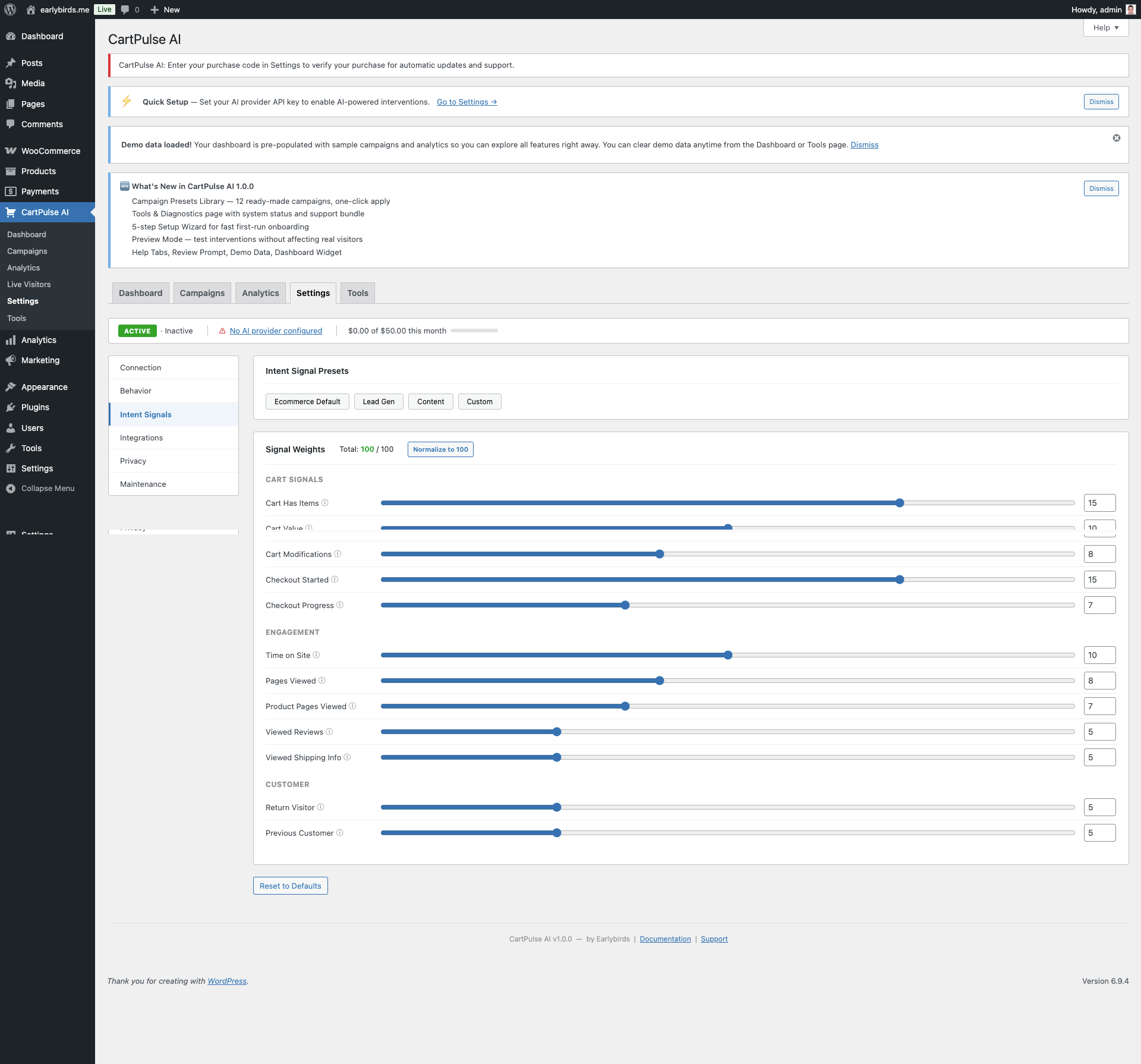 Settings: Intent Signal Weights
How the Score Is Calculated
- Each signal generates events as the visitor interacts with your store.
- Events are batched and scored client-side every 5 seconds (configurable).
- The raw score for each signal is calculated based on event frequency and recency.
- Raw scores are multiplied by their respective weights and summed.
- The total is clamped to 0–100.
Interpreting Intent Scores
| Score Range | Label | Typical Behavior | Recommended Trigger Threshold |
|---|---|---|---|
| 0–19 | Browsing | Casual page views, no cart activity. | Not recommended — too early for an intervention. |
| 20–39 | Interested | Viewing product pages, moderate scroll depth. | Use for email capture or social proof. |
| 40–59 | Warm | Items in cart, multiple product views. | General discount or free shipping nudge. |
| 60–79 | Hot | Active cart, checkout page visited. | Targeted discount for cart abandonment. |
| 80–100 | Very Hot | Deep checkout progress, high-value cart. | Checkout recovery with premium offer. |
Customizing Weights for Your Store
- High-value products — Increase the weight of
Product ViewsandTime on Pagesince these indicate research behavior. - Fast-purchase stores (food delivery, digital products) — Increase
Cart AdditionsandCheckout Progressweights since the decision cycle is shorter. - Multi-tab shoppers (electronics, travel) — Reduce the negative weight of
Tab Switchessince comparison shopping is normal behavior in this category.
25. Privacy & GDPR
Data Stored Locally
All data collected by CartPulse AI is stored in your WordPress database — no data is sent to Earlybirds servers. The following tables are created:
| Table | Contents |
|---|---|
{prefix}cp_sessions | Anonymous session ID, entry time, cart value, device type. |
{prefix}cp_behavior_events | Behavior events: page views, scroll depth, idle time, exit signals. |
{prefix}cp_intervention_logs | Which campaign/variant was shown, dismissal or conversion outcome. |
{prefix}cp_analytics | Aggregated daily metrics per campaign. |
{prefix}earlybirds_cp_token_usage | AI API token consumption per request (used for budget tracking). |
{prefix}earlybirds_cp_campaigns | Campaign configurations (admin-created data, not visitor data). |
{prefix}cp_cart_recovery | Cart recovery records with cart contents and recovery tokens. |
What Is Sent to AI Providers
When AI content is requested for an intervention, the plugin sends a prompt containing:
- Cart item names and quantities (not prices by default)
- Store name and configured tone/language
- Campaign instructions
Never sent: Customer names, email addresses, order IDs, payment details, IP addresses, or any PII.
Cookie Consent Integration
CartPulse AI auto-detects 6 popular cookie consent plugins:
- CookieYes
- Complianz
- Cookie Notice (by dFactory)
- Borlabs Cookie
- CookieBot
- WP Consent API
Tracking is gated until the visitor accepts the configured consent category (Statistics or Marketing). If no supported consent plugin is detected in “auto” mode, tracking starts immediately.
Do Not Track (DNT)
When enabled in settings, the plugin respects the browser’s DNT: 1 header. Visitors with DNT enabled will not be tracked and will not see interventions.
WordPress Privacy API
CartPulse AI integrates with Tools → Export Personal Data and Tools → Erase Personal Data. When a user requests export or erasure, the plugin includes or removes all session and event records linked to that user’s ID or email.
Data Retention
Set a retention period (1–365 days) under Settings → Privacy. A daily cron job (earlybirds_cp_cleanup_behavior) purges records older than the configured threshold.
Uninstall Cleanup
When Delete Data on Uninstall is enabled, all plugin tables, wp_options entries, and scheduled tasks are removed when the plugin is deleted from the Plugins screen.
26. How the Storefront Works
The storefront is a lightweight JavaScript module (~15 KB gzipped) that runs on the frontend of your WooCommerce store.
Script Loading
- The
StorefrontLoaderPHP class hooks intowp_enqueue_scripts. - It checks: plugin enabled? Consent given? User not in excluded role?
- If all checks pass, it enqueues
cp-storefront.min.jsandcp-storefront.min.css. - A
cpConfigJavaScript object is injected viawp_localize_scriptcontaining active campaigns, settings, cart data, and page context.
Session Flow
- Session Init — On first page load, the script creates or resumes a session via the REST API. A session cookie (
earlybirds_cp_session_id) persists the session ID. - Event Collection — Behavior events (page views, scroll, idle, cart changes) are collected in memory.
- Batch Sending — Events are sent to the server in batches at the configured interval (default: every 5 seconds).
- Intent Scoring — The client-side intent scorer calculates a 0–100 score from 12 weighted signals.
- Trigger Evaluation — Active campaigns are evaluated against the current state (intent score, cart value, page type, device, etc.).
- Intervention Rendering — When a campaign matches, the intervention is rendered as a DOM overlay.
- Outcome Tracking — Impressions, dismissals, clicks, and spins are logged back to the server.
Consent Gating
If a supported consent plugin is detected, the storefront script waits for consent before initializing any tracking. Events fired before consent is given are discarded.
Page-Unload Safety
On page unload, any pending events are flushed using the navigator.sendBeacon API to ensure data is not lost.
27. Demo Data System
CartPulse AI automatically imports demo data on first activation so you can explore all features immediately without waiting for real traffic.
What Is Imported
- Sample campaigns — Pre-configured campaigns using presets, covering different trigger types and intervention styles.
- 60 days of synthetic analytics — Daily metrics, conversion data, and funnel statistics that populate the dashboard and analytics charts.
- Demo sessions — Sample visitor sessions for the Live Visitors dashboard.
Clearing Demo Data
Demo data can be cleared in two ways:
- Dashboard — Click the “Clear Demo Data” link in the demo notice banner.
- Tools — Go to CartPulse AI → Tools and click Clear Demo Data.
Clearing demo data removes all synthetic campaigns, analytics, and sessions. Real data is never affected.
28. Compatibility
WooCommerce HPOS
CartPulse AI declares full compatibility with WooCommerce High-Performance Order Storage (HPOS / Custom Order Tables). It uses WooCommerce order APIs that work with both legacy wp_posts storage and the new wc_orders tables.
Cache Plugins
CartPulse AI works with page caching plugins (WP Rocket, W3 Total Cache, LiteSpeed Cache, etc.). The storefront script uses the REST API for dynamic data, so cached pages do not interfere with session tracking or intervention delivery.
/wp-json/earlybirds-cp/ path from caching. CartPulse AI will show a compatibility notice if WP Rocket is detected.Multisite
CartPulse AI has not been tested with WordPress Multisite. Activate and configure it on a per-site basis only. Network activation is not supported.
Staging vs. Production
You can run CartPulse AI on both staging and production sites. Use separate API keys per site. To avoid polluting analytics, either disable campaigns on staging or use the Preview Mode toggle.
Theme Compatibility
Interventions render as overlay elements (z-index: 999999) that work with any standard WordPress/WooCommerce theme. Customization is available via design options in the campaign editor.
28b. Best Practices & Strategy Guide
This section provides actionable guidance for getting the most out of CartPulse AI. Whether you’re setting up your first campaign or optimizing an existing strategy, these recommendations are based on common patterns across WooCommerce stores.
Getting Started Checklist
- Complete the Setup Wizard — This ensures your AI provider, privacy settings, and behavior tracking are configured correctly.
- Start with 2–3 campaigns — Don’t launch 10 campaigns at once. Start with one exit-intent popup, one cart-page bar, and one checkout abandonment campaign.
- Use Draft → Preview → Active workflow — Create campaigns as drafts, preview them using Preview Mode, then activate once satisfied.
- Monitor for 7 days — Check the analytics dashboard after one full week to see initial performance data.
- Iterate based on data — Use A/B testing to refine headlines, discounts, and templates.
Campaign Strategy by Store Type
High-Value Products (Electronics, Furniture, Jewelry)
- Visitors often research before purchasing. Use tab switch and idle timeout triggers to detect comparison shopping.
- Social proof and trust signals (return policy, testimonials) convert better than discounts.
- Set higher
min_intent_scorethresholds (50+) to target visitors who are genuinely considering a purchase. - Use email capture early, then follow up with cart recovery emails containing detailed product information.
Low-Margin / High-Volume Products (Fashion, Consumables)
- Free shipping nudges often convert better than percentage discounts.
- Use urgency campaigns with countdown timers for flash sales.
- The spin-to-win wheel works well for gamification-responsive audiences.
- Keep discount amounts small (5–10%) to protect margins.
Subscription / Digital Products
- Objection handling works well: highlight money-back guarantees, free trials, or instant access.
- Use checkout abandonment triggers specifically — visitors who reach checkout are high-intent.
- AI-generated content can address specific product objections dynamically.
Intervention Timing
| Too Early | Just Right | Too Late |
|---|---|---|
| Showing a popup 5 seconds after page load. Feels intrusive and visitors haven’t formed intent yet. | Showing an intervention when the visitor shows a genuine signal: exit intent, idle timeout, tab switch after adding to cart. | The visitor has already left. This is where Cart Recovery Emails take over. |
How Many Campaigns Should I Run?
- 1–3 campaigns — Ideal for small stores or getting started. One per trigger type is enough.
- 4–8 campaigns — Covers most scenarios: different triggers, device types, and cart value tiers.
- 8+ campaigns — Only for high-traffic stores where you can segment by product category, referrer source, or detailed cart value ranges.
Use the Max Interventions per Session setting (default: 2) to prevent visitors from seeing too many interventions in one session. This is crucial — showing 5 popups in one session will annoy visitors more than it helps.
Discount Strategy
| Approach | When to Use | Risk |
|---|---|---|
| No discount | Social proof, urgency, and value reminders are sufficient for your audience. | Lower conversion rate but better margins. |
| Small discount (5–10%) | Default for most stores. Enough to tip the scale for hesitant buyers. | Manageable margin impact. |
| Tiered discounts | Use different discounts for different cart values. 5% for $50+, 10% for $100+. | Requires multiple campaigns but maximizes margin. |
| Free shipping | Your free shipping threshold is close to the average cart value. | Zero margin impact if the visitor was going to add more anyway. |
| Large discount (15%+) | Checkout abandonment only, for high-value carts. Last resort. | Trains visitors to expect discounts. Use sparingly. |
AI Content Tips
- Set a tone that matches your brand — A luxury store should use “Professional,” not “Casual.”
- Fill in Store Context settings — The more context you provide (return policy, shipping policy, guarantees), the better the AI-generated content addresses real objections.
- Always have static fallback content — AI content may be unavailable (budget reached, API down). Your static text with merge tags should stand on its own.
- Use A/B testing to validate AI — Test AI-generated vs. static content to measure whether AI provides meaningful lift for your audience.
- Monitor the budget — Start with a $20–50 monthly budget and increase based on ROI data from the analytics dashboard.
GA4 Event Tracking
When a GA4 Measurement ID is configured, CartPulse AI pushes events to Google Analytics 4:
| Event Name | Parameters | When Fired |
|---|---|---|
cp_intervention_shown | campaign_id, variant, type, template | Intervention displayed |
cp_intervention_clicked | campaign_id, variant, action | CTA button clicked |
cp_intervention_dismissed | campaign_id, variant | Close button or overlay clicked |
cp_spin_result | campaign_id, slice_label, discount | Spin wheel result |
cp_email_captured | campaign_id | Email capture form submitted |
These events appear in GA4 under Events and can be used in custom audiences, conversion goals, and attribution reports.
29. Troubleshooting
Interventions Not Appearing
- Confirm the campaign is set to Active and within its scheduled date range.
- Check that your user role is not in the Excluded Roles list (Administrator is excluded by default). Use Preview Mode to test as admin.
- Open browser DevTools console for JavaScript errors. Look for
CP DebugHTML comments in the page source. - Verify cookie consent — if your consent plugin hasn’t been accepted, tracking is blocked. Toggle Cookie Consent to “None” temporarily to isolate.
- Check that WooCommerce is active and the page is a WooCommerce page (product, cart, checkout, shop).
- Verify the trigger conditions: minimum intent score, minimum cart value, device type, page type.
- Check max interventions per session — if the visitor has already seen the maximum, no more will fire.
- Enable Debug Mode in Settings and check WooCommerce → Status → Logs for
cartpulse-aientries.
AI Content Not Generating
- Go to Settings → AI and click Test Connection. If it fails, your API key may be invalid or have insufficient credits.
- Check the monthly budget — if reached, AI is paused until the next billing cycle. The campaign uses its static fallback message.
- Verify the model name matches one available in your API account (e.g.,
gpt-4orequires OpenAI access). - Check the log viewer in Tools for AI-related error messages.
Coupons Not Applying
- Verify the coupon exists in Marketing → Coupons.
- Check coupon expiry — the coupon may have already expired (configurable per campaign).
- Verify the discount type and amount are valid for the cart contents.
- Check WooCommerce coupon settings for minimum spend or product restrictions.
Analytics Not Updating
- Analytics are aggregated by an hourly cron job. Wait up to 60 minutes after a conversion.
- If data is still missing, run
wp earlybirds statusand verify WP-Cron is running. - Check that the visitor’s session was not excluded by role, page, or consent settings.
- Verify the
earlybirds_cp_aggregate_analyticscron event is scheduled (check Tools → System Status).
Database Migration Errors
- Verify your database user has
CREATE TABLEprivileges. - Run
wp earlybirds migratevia WP-CLI for detailed error output. - Check the log viewer for migration-specific errors.
- If tables already exist partially, use Tools → Run Migrations (safe to re-run).
PHP Warning: sodium Extension Missing
API key encryption requires the sodium PHP extension (bundled with PHP 7.2+, enabled by default on most hosts).
- Contact your host to enable
ext-sodium. - cPanel hosts: add
extension=sodiumto yourphp.ini. - The plugin works without sodium, but API keys will be stored without encryption.
REST API Errors (403/401)
- Ensure your WordPress REST API is not blocked by a security plugin (Wordfence, Sucuri, etc.).
- Check
.htaccessrules that might block/wp-json/requests. - Verify the nonce is being sent correctly (check for caching plugins stripping nonces).
Storefront Script Not Loading
- Check the page source for
<!-- CP Debug: ... -->comments that explain why the script was skipped. - Verify that
storefront/build/cp-storefront.min.jsexists in the plugin directory. - Check for JavaScript conflicts with other plugins by deactivating them one at a time.
Weekly Digest Not Sending
- Verify Weekly Digest is enabled in Settings → Notifications.
- Check that WP-Cron is running (
wp cron event list). - Verify the recipient email address is valid.
- Check your server’s mail logs or use an SMTP plugin for reliable email delivery.
Cart Recovery Emails Not Sending
- Verify Cart Recovery is enabled in Settings.
- Check the
earlybirds_cp_send_recovery_emailscron event in Tools → System Status. - Ensure email addresses are captured (visitors must provide their email at checkout or via email capture).
- Check server mail configuration and WP mail logs.
Spin Wheel Not Animating
- Check the browser console for JavaScript errors.
- Verify the campaign has at least 3 slices configured with valid labels and colors.
- Ensure the spin wheel JavaScript is loaded: look for
cp-storefront.min.jsin the page source. - Test in an incognito window to rule out browser extension conflicts.
High AI Budget Usage
- Check which campaigns are using AI content mode — campaigns set to
ai_generatedconsume budget on every unique impression. - Switch low-value campaigns (e.g., bars, slide-ins) to
staticmode with merge tags. Reserve AI for high-impact campaigns (popups on checkout). - Reduce the campaign frequency from
alwaystoonce_per_sessionoronce_per_day. - Check the Tools → Token Usage table to see which campaigns are the heaviest AI consumers.
- Consider using a smaller model (e.g.,
gpt-3.5-turboinstead ofgpt-4o) for campaigns where content quality is less critical.
Interventions Appearing on Admin Pages
- This should not happen if your role is in the Excluded Roles list. Check Settings → Excluded Roles.
- Verify that Admin users are excluded (they are by default). If you removed Administrator from the list, add it back.
- If you’re in Preview Mode, interventions will appear for admins on the frontend by design. Toggle Preview Mode off.
Performance Concerns
CartPulse AI is designed to be lightweight. If you notice performance issues:
- Check the batch interval — The default 5000 ms interval means ~12 requests per minute per visitor. On very high-traffic stores, increase to 10000 ms or higher.
- Check data retention — Long retention periods (365 days) with heavy traffic can result in large database tables. Reduce to 30–60 days.
- Run database maintenance — Use Tools → Clear Sessions and Clear Behavior Events periodically on high-traffic stores.
- Enable object caching — CartPulse AI uses WordPress object cache. Install Redis or Memcached for best performance.
30. FAQ
Do I need an API key?
No. CartPulse AI works without an AI provider. Built-in templates use merge tags for personalization. Adding an AI provider (OpenAI or Anthropic) enhances interventions with dynamic, context-aware copy. You control costs via the monthly budget setting.
Where is data stored?
All data is stored in your WordPress database. Sessions, events, campaigns, and analytics never leave your server. Only the prompt content (cart summary, store context) is sent to the AI provider when AI content is requested.
Can I use my own coupon codes?
Yes. In the campaign’s static template, reference any existing WooCommerce coupon code. Alternatively, enable auto-generation to create unique coupons on the fly.
Does it work with HPOS?
Yes. CartPulse AI declares WooCommerce HPOS compatibility and uses order APIs that work with both legacy wp_posts storage and the new wc_orders tables.
How do I translate the plugin?
A .pot file is included in languages/. Use Poedit, Loco Translate, or a similar tool to create .po/.mo files. Place them in wp-content/languages/plugins/.
Which cookie consent plugins are supported?
Auto-detect mode supports: CookieYes, Complianz, Cookie Notice (dFactory), Borlabs Cookie, CookieBot, and WP Consent API. Tracking is gated until consent is given.
Does it slow down my store?
No. The storefront script is ~15 KB gzipped, loads asynchronously, and uses a beacon pattern for server communication. No impact on page load times or Core Web Vitals.
Can I run it on staging and production?
Yes. Use separate API keys per site, and verify your purchase where needed for updates and support. Disable campaigns or use Preview Mode on staging to avoid polluting analytics.
Does it work on WordPress Multisite?
CartPulse AI has not been tested with Multisite. Activate on a per-site basis only.
How does revenue attribution work?
When a visitor sees an intervention and later completes a purchase in the same session, the order revenue is attributed to that campaign. This happens automatically via the woocommerce_checkout_order_processed hook.
What happens when the AI budget is reached?
AI content generation pauses. Campaigns automatically fall back to their static template text (headline, body, CTA). Tracking and analytics continue normally.
Can I customize the intervention styles with CSS?
Yes. Interventions have well-structured CSS classes prefixed with cp-. You can add custom CSS in your theme’s Additional CSS or a child theme stylesheet.
How do I test campaigns without affecting real visitors?
Enable Preview Mode from the Dashboard. This shows interventions only to administrators while regular visitors continue to see normal behavior.
What data is included in the support bundle?
System status, plugin settings (API keys redacted), campaign configs, and the last 500 log lines. No visitor data or PII is included.
Can campaigns be cloned?
Use Export → Import to duplicate campaigns. Export creates a JSON file; import creates all campaigns as drafts that you can customize.
How is the intent score calculated?
The score combines 12 weighted signals: time on page, scroll depth, cart additions, checkout progress, page views, return visits, idle time, exit signals, tab switches, cart modifications, product views, and category browsing. Weights are configurable in Settings.
What is the difference between static and AI content?
Static content uses pre-written templates with merge tags for personalization (e.g., {cart_total}, {product_name}). It’s free, predictable, and works without any API key. AI content dynamically generates headlines and body copy using your configured AI provider, taking into account cart context, store policies, and campaign tone. AI content costs money per request (tracked against your monthly budget) but can produce more relevant, persuasive messaging. Static text always serves as a fallback if AI is unavailable.
Is there a limit on the number of campaigns?
No hard limit. You can create as many campaigns as needed. However, only active campaigns are evaluated per visitor session, and the Max Interventions per Session setting controls how many a visitor actually sees (default: 2).
Can I target specific products or categories?
Yes. Use the cart_contains trigger type to fire campaigns only when the cart includes specific product IDs or category slugs. Combine with page-type targeting (product) to show interventions only on specific product pages.
How do I uninstall completely?
Enable Delete Data on Uninstall in Settings → Privacy before deactivating. Then deactivate and delete the plugin from the Plugins screen. All plugin database tables, wp_options entries, and scheduled cron events will be removed.
Can I use CartPulse AI with a headless / decoupled WooCommerce setup?
CartPulse AI relies on the standard WordPress frontend and wp_enqueue_scripts to load the storefront. Headless setups that don’t render WordPress PHP templates will not load the storefront script automatically. However, the REST API endpoints are fully available, so you could build a custom integration for your headless frontend.
How do I update the plugin?
Enter your CodeCanyon purchase code in Settings → License. Once verified, updates appear in the standard WordPress Dashboard → Updates screen. Alternatively, download the latest version from CodeCanyon and upload it via Plugins → Add New → Upload Plugin.
Does CartPulse AI affect SEO or Core Web Vitals?
No. The storefront script (~15 KB gzipped) loads asynchronously and does not block rendering. It does not inject visible content into the initial page load, so it has no impact on Largest Contentful Paint (LCP), First Input Delay (FID), or Cumulative Layout Shift (CLS). Intervention overlays are dynamically injected via JavaScript after user interaction events, not during initial page render.
Can I white-label the plugin?
CartPulse AI does not include a built-in white-label feature. However, the CSS classes are prefixed with cp- and can be restyled. The admin page branding can be modified via the earlybirds_cp_storefront_config filter and custom CSS.
31. Changelog
Version 1.0.0 (April 2026)
- Initial release — AI-powered real-time cart abandonment prevention for WooCommerce.
- AI-powered interventions using OpenAI (GPT-4o, GPT-3.5) and Anthropic (Claude 3 Haiku, Sonnet, Opus).
- Real-time behavior tracking engine with 12-signal intent scoring (0–100 scale).
- 9 trigger types: exit intent, idle timeout, scroll depth, tab switch, cart value, checkout abandon, URL pattern, referrer match, cart contains.
- 8 intervention template types: popup, slide-in, top bar, bottom bar, fullscreen, inline, spin-to-win wheel, email capture.
- 6 intervention strategies: personalized discounts, free shipping, social proof, urgency, objection handling, value reminders.
- Email capture intervention type with dedicated popup and cart recovery integration.
- Campaign builder with scheduling, priority, device targeting, page-type filters, and minimum intent score thresholds.
- A/B testing with split ratios, deterministic assignment, results view, and auto-winner detection at configurable confidence.
- 12 ready-made campaign presets.
- Visual analytics charts: revenue saved (line), interventions vs conversions (bar), conversions by strategy (donut), checkout funnel (horizontal bar).
- Live campaign preview panel with real-time updates as you edit.
- Real social proof merge tags pulling live WooCommerce data ({recent_purchases}, {recent_buyers}, {product_rating}, {review_count}).
- Spin-to-win wheel with 3–8 configurable slices, probability weights, and real coupon generation.
- Campaign import/export (JSON format).
- Cart recovery emails with configurable delays and coupon integration.
- Live visitors dashboard with real-time intent scores and cart values.
- Analytics dashboard with summary metrics, campaign performance, intent distribution, date ranges, and CSV export.
- Weekly email digest and revenue milestone alerts.
- Coupon auto-generation with cleanup cron.
- 14 merge tags for dynamic template personalization.
- 5 animation styles: fade, fade-up, slide, slide-left, bounce.
- GA4 event tracking integration.
- Webhook delivery with HMAC-SHA256 signature verification.
- REST API for campaigns, analytics, and settings.
- WP-CLI commands: migrate, cache:flush, status, settings:export, settings:import.
- API key encryption at rest using libsodium.
- Rate limiting (60/min general, 10/min AI endpoints).
- Monthly AI budget cap with automatic fallback to static templates.
- WooCommerce HPOS compatibility declaration.
- Cookie consent auto-detection (6 plugins supported).
- Do Not Track (DNT) browser header respect.
- GDPR privacy exporters and erasers via WordPress Privacy API (sessions, behavior events, intervention logs, cart recovery).
- Configurable data retention with auto-purge cron.
- Tools & Diagnostics page with 15+ system checks, 7 maintenance tools, log viewer, and support bundle.
- Demo data auto-imported on first activation (draft sample campaigns and analytics).
- Automatic plugin update delivery via
support.earlybirds.me. - Translation-ready with POT file.
- 5-step setup wizard with preflight checks.
32. Support & Credits
Getting Support
For support, please use the support channel linked in your CodeCanyon purchase confirmation. Include your support bundle (from Tools → Generate Support Bundle) for faster resolution.
Before Contacting Support
- Check the Troubleshooting section for common issues.
- Review the FAQ section.
- Enable Debug Mode and check the log viewer for error messages.
- Generate a support bundle from the Tools page.
Third-Party Credits
See THIRD_PARTY_LICENSES.md in the plugin folder for full third-party license text.
| Library | Version | License | Usage |
|---|---|---|---|
| Chart.js | 4.4.7 | MIT | Analytics dashboard charts. |
License
CartPulse AI is licensed under the GPL v2 or later. See the license.txt file included with the plugin for full license text.
CartPulse AI v1.0.0 — By Earlybirds — © 2026 All Rights Reserved.